Claude Code for SEO: setup, step by step
Claude Code is Anthropic's AI assistant that works inside a folder on your own computer, where it can read your files, run commands and write new files after you approve them.
Claude Code can run on your own computer, in a folder you choose, and can open your SEO exports, run checks and write new files. This lesson takes you from no terminal at all to four real jobs, with the exact prompts and the output I got on 13 November 2026, mistakes included.

Key takeaways
- Claude Code needs a paid Claude plan or a pay-as-you-go API account: on 13 November 2026 Pro cost $20 a month ($17 billed yearly), and the Free plan did not include Claude Code.
- Since version 2.1.283, a new terminal session starts in auto mode wherever it is available, and a second model then approves actions instead of you, so start client work with claude --permission-mode manual.
- A CLAUDE.md file is guidance Claude reads every session; only permission rules in .claude/settings.json are enforced, and even those do not stop a script that opens files on its own.
- In four real jobs on made-up data, the files Claude Code wrote matched my own recount every time, while its chat summaries miscounted twice, so recount any number with a script before you use it.
- Keep every export untouched in a data folder and every new file in an output folder: then you can check each result, and a bad edit never touches your originals.
What Claude Code is, and how it differs from the Claude app
Claude Code is Anthropic's assistant that works inside a folder on your computer. It reads the files there, runs commands and writes new files, and in Manual mode it asks before it changes anything. The Claude app is a chat window: it sees only what you paste or upload into the conversation.
Anthropic's own description is short. In How Claude Code works (read 13 November 2026) it is "an agentic assistant that runs in your terminal" that "can help with anything you can do from the command line". Agentic means it works in a loop: Anthropic names the three phases "gather context, take action, and verify results", and it repeats them until the task is done or you stop it.
You do not need to write code to use it. The terminal guide says it plainly: "You don't need to know how to code. Describe what you want in plain English, and Claude writes the code for you." For SEO that matters, because most useful checks on an export are a small script that counts, compares or fetches. You describe the check; Claude Code writes and runs the script.
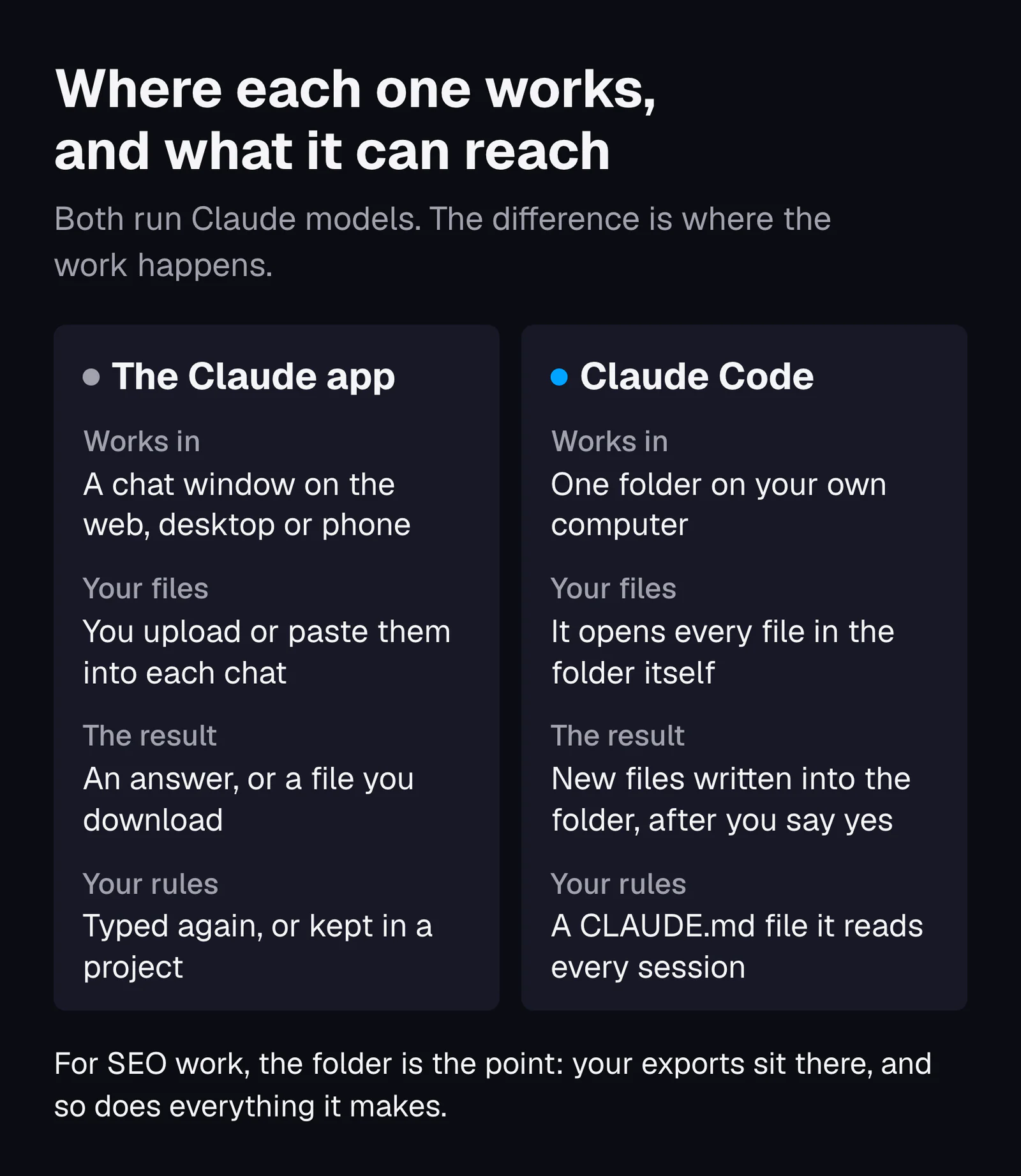
The difference on the jobs an SEO actually does
| Job | The Claude app | Claude Code |
|---|---|---|
| Read a crawl export | You upload it to the chat | It opens the file in the folder |
| Count rows by a rule | Works in the chat on what you uploaded | Writes a short script on your computer and runs it, which you can see and rerun |
| Fetch a status code | Uses its own web tools | Runs a command like curl from your machine, after you approve it |
| Save the result | A file you download from the chat | A new file in your folder, next to the data it came from |
| Remember your rules | You repeat them, or keep them in a project | A CLAUDE.md file in the folder, read at the start of every session |
Claude Code also runs inside VS Code and JetBrains editors, in a desktop app and on the web, according to the Claude Code overview. This lesson uses the terminal, because it is what the official install guide starts with. For what Claude is good and bad at as an SEO assistant in general, read Claude for SEO; this lesson is the setup.
What Claude Code costs, and which plan you need
Claude Code needs a paid plan, Pro or higher, or a pay-as-you-go account on the Claude Console. On Anthropic's pricing page, read on 13 November 2026, the Free plan did not include Claude Code and Pro was the cheapest plan that did. Prices change, so check the page on the day you sign up.
| Plan | Price (13 Nov 2026, before tax) | Claude Code | Usage |
|---|---|---|---|
| Free | $0 | No | Limited |
| Pro | $20 a month, or $17 a month billed yearly ($200 up front) | Yes | Limits every 5 hours and every week |
| Max | $100 a month | Yes | 5 times Pro |
| Ultra | $200 a month | Yes | 10 times Pro each week, no 5-hour limit for verified accounts |
| Team, standard seat | $25 a seat a month, or $20 billed yearly | Yes | More than Pro |
| Console (API) | Pay per use, from prepaid credits | Yes | What you pay for |
Three details on Anthropic's help page Use Claude Code with your Pro, Max, or Ultra plan are worth knowing before you pay:
- The limits are shared. "These limits are shared across Claude and Claude Code", so a long chat in the app and a long job in Claude Code draw from the same allowance.
- An API key on your computer overrides the plan. If an environment variable (a named setting your computer hands to every program) called
ANTHROPIC_API_KEYis set, Claude Code uses it "instead of your Claude subscription", which means API charges. To check, typeecho $ANTHROPIC_API_KEYin Terminal on a Mac, orecho $env:ANTHROPIC_API_KEYin PowerShell: an empty line means it is not set. If Claude Code ever asks whether to use an API key and you did not plan to pay per use, say no. - Max's API credits do not cover Claude Code. The monthly API credits that come with Max and Ultra "can't be used in Claude Code or the Claude apps".
What does one SEO job cost? I timed the four jobs in this lesson. Each took 17 to 32 seconds on Claude Sonnet 5.5, and Claude Code's own counter put each at 7 to 9 cents at API list prices, 31 cents for all four. On a Pro plan that comes out of your plan's usage instead of your card. For scale, Anthropic's costs page reports that across company deployments, developers average about $13 per active day, because they run it for hours.
Start on Pro. Anthropic's own help page suggests moving to Max if you "consistently hit limits", which is the right test: wait until it happens.
How to install Claude Code on a Mac or a Windows PC
You paste one install command into Terminal on a Mac or PowerShell on Windows, wait, then open a new window and type claude --version. If it prints a version number followed by "(Claude Code)", it worked. The steps below follow Anthropic's setup page and terminal guide, read on 13 November 2026. The computer needs 4 GB of memory or more and an internet connection.
On a Mac
- Check your macOS version. Claude Code needs macOS 13.0 or later. The Apple menu, then About This Mac, shows yours.
- Open Terminal. Press Cmd and Space, type Terminal, press Enter. A window with a blinking cursor opens.
- Paste the install command and press Enter:
curl -fsSL https://claude.ai/install.sh | bash
- Wait. The command shows no progress while it downloads. Leave the window open until you see "Claude Code successfully installed!"
- Open a new Terminal window and check:
claude --version - If you see "command not found: claude", the install folder is not on your PATH yet, the list of places Terminal looks for programs. The installer prints the fix under "Setup notes". For the Mac's default shell it is
echo 'export PATH="$HOME/.local/bin:$PATH"' >> ~/.zshrc, then open a new window and try again.
Homebrew users can run brew install --cask claude-code instead. Anthropic notes that Homebrew and WinGet installs do not update themselves, while the native install above updates in the background.
On Windows
- Check your Windows version. Claude Code needs Windows 10 version 1809 or later. You do not need to run anything as Administrator.
- Install Git for Windows (optional). Download it from git-scm.com/downloads/win and click Next on every screen to accept the defaults. It lets Claude Code run commands in Bash, the same command shell a Mac uses. Without it, Claude Code uses PowerShell for commands instead, and you never have to learn Git yourself.
- Open PowerShell. Press Win and X, then choose Windows PowerShell or Terminal. Check the start of the line: PowerShell shows
PS C:\Users\YourName>; the older CMD window shows the same without the PS. - Paste the install command and press Enter:
irm https://claude.ai/install.ps1 | iex
- Wait for "Claude Code successfully installed!", then open a new PowerShell window and run
claude --version.
Two error messages tell you that you are in the wrong window, according to the setup page:
- "The token '&&' is not a valid statement separator" means you pasted the CMD command into PowerShell.
- "'irm' is not recognized as an internal or external command" means you are in CMD. Either open PowerShell, or use the CMD command:
curl -fsSL https://claude.ai/install.cmd -o install.cmd && install.cmd && del install.cmd
WinGet users can run winget install Anthropic.ClaudeCode. If PowerShell says "'claude' is not recognized" after a successful install, it is the same PATH problem as on the Mac; the terminal guide's troubleshooting section has the Windows fix.
If you would rather not use a terminal
Anthropic's desktop app for macOS and Windows has a Code tab that "includes Claude Code, so you don't need to install the CLI separately", according to the overview. It needs a paid plan. The prompts in this lesson are plain text, so you can type them there too.
How to run your first session in an empty project folder
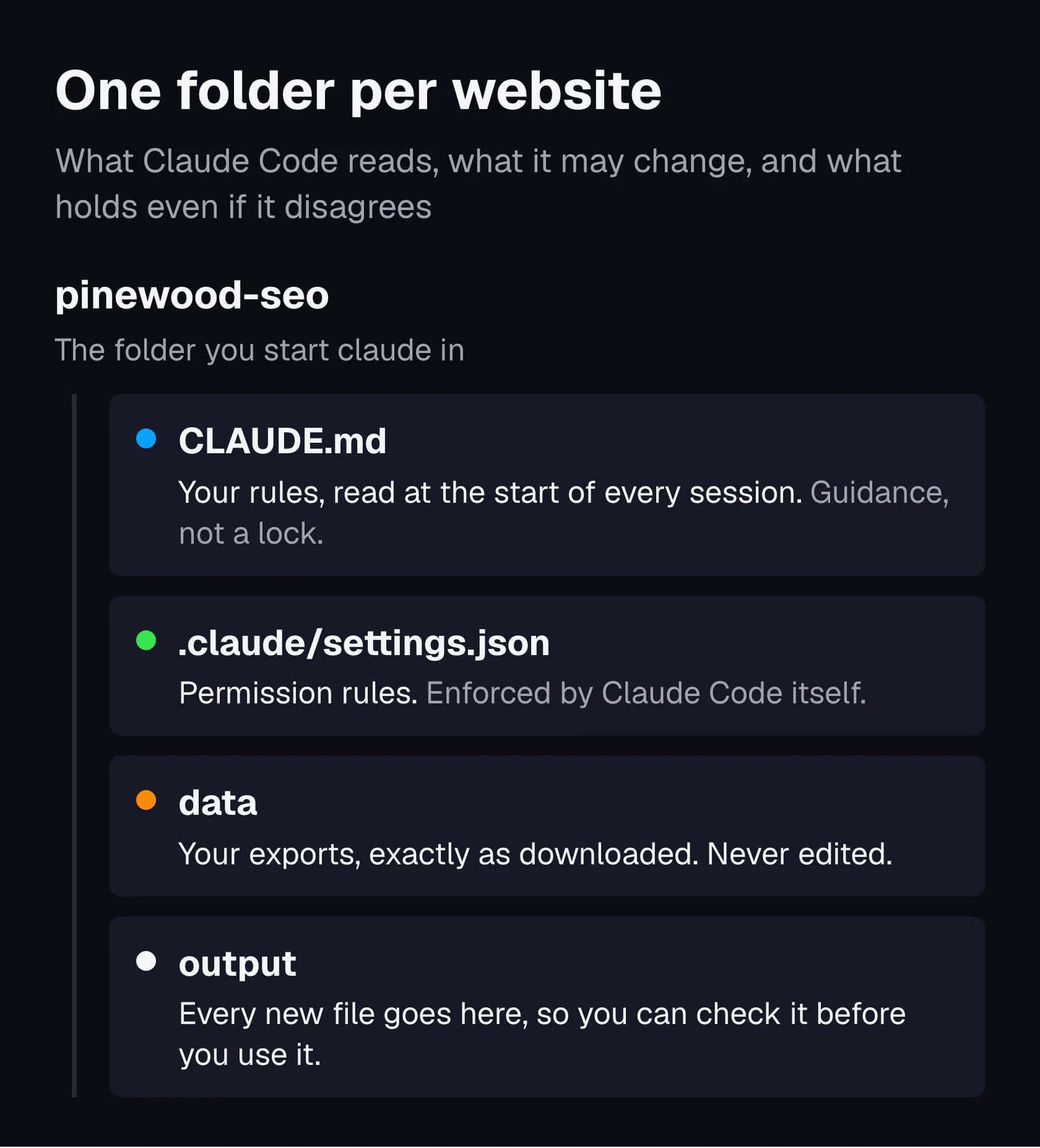
Make one folder per website, put two empty folders called data and output inside it, open a terminal in that folder and type claude --permission-mode manual. The first time, a browser window opens so you can sign in with your Claude account. Then type a plain question, such as "What files are in this folder?"
- Make the folder. In Finder or File Explorer, create Documents, then pinewood-seo, then data and output inside it. Use your own site's name.
- Open a terminal in it. On a Mac:
cd ~/Documents/pinewood-seo. In PowerShell:cd $HOME\Documents\pinewood-seo. The cd command moves the terminal into that folder. - Start Claude Code in Manual mode:
claude --permission-mode manual. Manual mode means it asks you before it edits a file or runs a command; the safety section below covers the other modes. Sign in when the browser opens. Anthropic's quickstart says your credentials are then stored, so you won't need to log in again. - Answer the trust question. In a folder it has not seen before, Claude Code asks whether you trust the folder. Say yes for a folder you made yourself. Anthropic's security page warns that if you start it in your home folder, the answer is not saved and the question comes back every time, one more reason to work in a project folder.
- Ask your first question: "What files are in this folder, and what is each one?" Press Enter to send.
- Answer its questions with the keyboard. You cannot click in the terminal. When Claude Code asks for permission, the terminal guide says to use the arrow keys to move between answers and press Enter to choose; Yes approves the action once.
Five keys cover almost everything a beginner needs, from the terminal guide and the quickstart:
| Key or command | What it does |
|---|---|
| Esc | Stops Claude while it is working |
| Esc twice, with an empty prompt | Opens the rewind menu, which can restore files Claude edited |
| Shift and Tab | Switches the permission mode (covered further down) |
| /help | Lists the commands |
| exit, or Ctrl and D twice | Leaves Claude Code |
Why one folder per site? Claude Code loads its instructions file and saves your permission choices per folder, according to its memory and permissions pages. One folder per site keeps one client's rules, files and history out of the next client's work.
How to give Claude Code your SEO data
Export the files, copy them into the data folder without changing them, and say in your prompt what each one is. Four exports cover most first jobs: a Search Console export, a crawl export, your sitemap and a keyword list.
| Export | Where it comes from | What to watch for |
|---|---|---|
| Search Console queries | The Performance report, then its export button | It shows impressions and clicks, not search volume. Google's help page says values shown as ~ or - become zeros in the download. |
| Crawl export | Any site crawler: export the pages with address, status code, indexability and title | It includes redirects, 404s and PDFs. Tell Claude which rows count, or it will guess. |
| Sitemap | Your site's /sitemap.xml, or the Sitemap line in /robots.txt, saved as a file | It may be an index that lists other sitemaps. Save each one. A file holds at most 50,000 URLs. |
| Keyword list | Your keyword tool, with a keyword column and a monthly searches column | The volumes are that tool's estimates. Claude cannot check them. |
Three habits make every later job safer. Keep the original file names, so you know which tool each file came from. Never edit anything in data. And leave out what you may not share: a Search Console export has no personal data, but a customer list or an order export does.
Download the Pinewood Pets practice filesZIP, under 6 KB: the data, the CLAUDE.md and settings file from this lesson, and a small stand-in server for the sitemap job
How to write a project instructions file (CLAUDE.md) for SEO work
A CLAUDE.md file is a plain text file in the project folder that Claude Code reads at the start of every session. Put your standing rules there: where files go, which numbers it may use, and when it must stop and ask. Type /init in a session and Claude Code writes a first draft for you to edit.
Anthropic's memory page gives two rules for the file. Keep it short: "target under 200 lines per CLAUDE.md file", because "longer files consume more context and reduce adherence". And know what it is not: Claude treats it "as context, not enforced configuration". Here is the whole file I wrote for the practice folder, 14 lines long, with the reason for each part.
| What the file says | Why it is there |
|---|---|
# Pinewood Pets SEO workspace / Pinewood Pets is a made-up online store for dog and cat supplies. This folder holds its SEO exports. | One line of context, so every answer starts from the right business |
## Files / data/ holds the exports as they came out of each tool. Never edit, rename or delete anything in data/. / output/ is where every new file goes. | Your originals stay intact, and every result lands in one place you can check |
## Rules / Use only numbers that are in these files. If a number is not in a file, say "not in the data". Never estimate search volume, traffic or rankings. | Gives it a sentence to say instead of a guess |
| When you give a number, name the file it came from. | Every number becomes checkable |
| Before you change or create more than one file, show me the plan and wait for my yes. | Stops one vague request from turning into ten new files |
| Say how many rows you read, so I can check you read them all. | A quick test that the whole file was read |
| Plain English, short sentences. No jargon without a one-line explanation. | The output may go to a client |
What the file changed in one test
I typed the same vague request, "Fix the duplicate titles.", in two fresh copies of the practice folder: identical data, an empty output folder, one copy with this file and one without it. Both runs had permission to write files.
- With the file, Claude Code created nothing. It listed the duplicates, proposed three new files for the output folder, and ended: "Shall I go ahead with the 3 files?" That is the plan-first rule working.
- Without the file, it wrote two new files straight into the top of the folder, without asking.
Neither run changed the crawl file: I compared its checksum, a fingerprint of the file's contents, before and after. Both runs also counted "Grain Free Dog Food" and "Grain-Free Dog Food" as the same title, because neither prompt said what "the same" means. Job 1 below did say it, and that run left the pair out. One run each is an illustration, not a measurement. It still shows the point: the file changes what Claude tries to do. What Claude is allowed to do is set somewhere else, covered in the safety section.
The easiest way to get the file right is to copy it from the practice files, or to ask Claude Code to create CLAUDE.md with your text. A word processor can save it as the wrong kind of file, and Claude Code reads only a plain text file with exactly that name.
Job 1: find pages with missing or duplicate titles in a crawl export
Give Claude Code the crawl export and an exact rule for what counts as the same title. On the practice crawl it read 25 rows, checked 21, skipped 4 with a reason for each, and found 2 missing titles and 4 groups of duplicates. My own script found exactly the same.
How I ran the four jobs: in the practice folder, on a Mac, with Claude Code 2.1.318 and none of my own settings loaded. I used claude -p, which runs one prompt and prints the answer, and approved the tools each job needed in advance, so I could save the exact output. In a normal session you type the same prompt and approve each step as it comes. This was the prompt:
Read data/crawl.csv. Find the pages with a missing title and the pages that share a title with another page. Count two titles as the same if they only differ in capital letters or spaces. Only check pages that returned a 200, are HTML and are indexable, and list anything you skipped with the reason. You have my yes to save the findings to output/title-issues.csv. Then give me a short summary.
It finished in 17 seconds. What it found, and why each one is a problem:
| Finding | Pages | Why it happened |
|---|---|---|
| Missing title | /dog-harnesses/no-pull-harness/ | The title cell is empty |
| Missing title | /shipping/ | The title is two spaces, which it counted as missing |
| Duplicate, group 1 | /dog-harnesses/ and /dog-harnesses/?page=2 | Page 2 of a list reuses page 1's title |
| Duplicate, group 2 | /cat-litter/clumping-cat-litter/ and /cat-litter/clumping/ | Two addresses for one product range |
| Duplicate, group 3 | /blog/how-to-fit-a-dog-harness/ and its /amp/ copy | A second version of the same post |
| Duplicate, group 4 | /blog/best-cat-litter-for-odor/ and /blog/cat-litter-odor-tips/ | Same words, different capitals and a trailing space |
| Skipped | /cart/, /old-harness-page/, /summer-sale/, the size chart PDF | Not indexable, a 301, a 404, and not HTML |
The most useful line in its answer was one it did not count. It noticed that "Grain Free Dog Food" and "Grain-Free Dog Food" differ only by a hyphen, and left them out because "your rule only ignores capitals and spaces". Then it asked whether I wanted them counted. That is the behavior you want: it applied my definition and flagged the edge of it. It also mentioned that the reflective harness title repeats the brand name, outside the task.
Why bother? Google's guide to title links (updated 10 December 2025) asks you to make sure "every page on your site has a title specified" and to avoid "repeated or boilerplate text", because identical titles make it "impossible for users to distinguish between two pages".
Job 2: group a keyword list by intent and flag likely duplicates
Ask for one intent per keyword from a short fixed list, and for pairs that are the same search worded two ways. On the 26 practice keywords it labeled every row, found 7 pairs, marked 2 of them as unsure, and wrote a file that matched my own recount. Its chat summary, though, got one count wrong.
Read data/keywords.csv. Give every keyword one search intent: buy (they want a product or a store), learn (they want an answer), compare (they are choosing between options) or brand (they searched for Pinewood Pets). Then flag pairs that are likely the same search said two ways, so one page should cover both. For each pair, say which one to keep as the main wording, using the monthly_searches column. You have my yes to save it to output/keyword-groups.csv. Then summarize, and list the pairs you were unsure about.
| Keep as the main wording | Fold in | Monthly searches (made up) |
|---|---|---|
| dog harness | dog harnesses | 6,600 and 2,400 |
| no pull dog harness | no-pull harness for dogs | 3,600 and 1,300 |
| small dog harness | harness for small dogs | 1,900 and 880 |
| how to put on a dog harness | how to fit a dog harness (unsure) | 1,600 and 720 |
| best cat litter for odor | best cat litter for smell (unsure) | 1,900 and 1,000 |
| how often to change cat litter | how often should you change cat litter | 1,300 and 880 |
| grain free dog food | grain-free dog food | 3,600 and 1,000 |
Its doubts were sensible. It thought someone searching "fit" may want sizing help, not steps for putting a harness on. It left "cat litter" and "clumping cat litter" unpaired, because the second is one type of the first. And it ended with an honest limit: "The intent labels are my judgment from the wording alone. The file has no data on what actually ranks for these searches."
The count that was wrong
The summary said 12 keywords had a buy intent. The file it wrote had 14. Its four counts added up to 24, two short of the 26 rows it said it read. I asked it to "count the intents in output/keyword-groups.csv with a script, not by reading". The script returned 14, and it answered: "My summary said 12 buy keywords. The correct number is 14." The file was right all along. Only the summary was wrong.
Settle each pair on the results page, not on the wording
Wording alone cannot decide whether two searches need one page. The test is what Google shows: search both, and if mostly the same pages rank for each, one page should cover both. Koray Tuğberk Gübür, whose framework this library draws on, offers a fuller test he calls Query Deserves a Page; it is explained in Koray Tuğberk Gübür's framework. Use Claude's pairs as a shortlist to check, then read when a search deserves its own page before you merge anything. Two pages chasing one search is how keyword cannibalization starts.
Job 3: check every URL in a sitemap for its status code
Ask Claude Code to fetch every URL in the sitemap and record the first status code, where it redirects, how many hops it takes and the final code, plus whether the final page says noindex. On the practice sitemap, 6 of 11 URLs could stay, 2 redirected and 3 had to come out.
A made-up site has no live pages, so I ran a tiny stand-in copy of it on my own computer (it is in the practice files). The status codes below are real answers from that server. To run it yourself, open a second terminal window in the practice folder and type python3 stand-in-server.py (on Windows, python stand-in-server.py; both need Python 3 installed). Leave it running during the job, then press Ctrl and C in that window to stop it. On your own site, point the same prompt at your live sitemap. In Manual mode, Claude Code asks before each curl command, the tool that fetches a URL, because Anthropic's security page says network commands "are not auto-approved by default".
Check every URL in data/sitemap.xml. For each one, record the status code, where it redirects to if it redirects, how many redirects it takes to reach the final page, and the final status code. Also check whether the final page has a noindex tag. A sitemap should only list pages that return 200 and can be indexed, so mark every URL that should come out of the sitemap or be replaced with its final address. You have my yes to save the results to output/sitemap-check.csv. Then summarize.
| What it found | URLs | What to do |
|---|---|---|
| 200 and indexable | /, /dog-harnesses/, /cat-litter/, /cat-litter/clumping-cat-litter/, /blog/how-to-fit-a-dog-harness/, /about/ | Keep (6) |
| 301, one hop to /dog-harnesses/ | /dog-harnesses (no trailing slash) | Replace with the final address, which is already listed, so delete this line |
| 301, two hops to /dog-harnesses/ | /old-harness-page/ | Replace with the final address (already listed), and fix the chain in job 4 |
| 404 | /cat-litter/clumping/, /summer-sale/ | Remove (2) |
| 200, but noindex | /cart/ | Remove: it asks not to be indexed |
I checked every code myself with curl, and the file was right. The summary was not. It opened with "5 pages are fine and 6 need a change", directly above a table of 6 to keep and 5 to change. That is the second job out of four where the chat summary miscounted and the file did not.
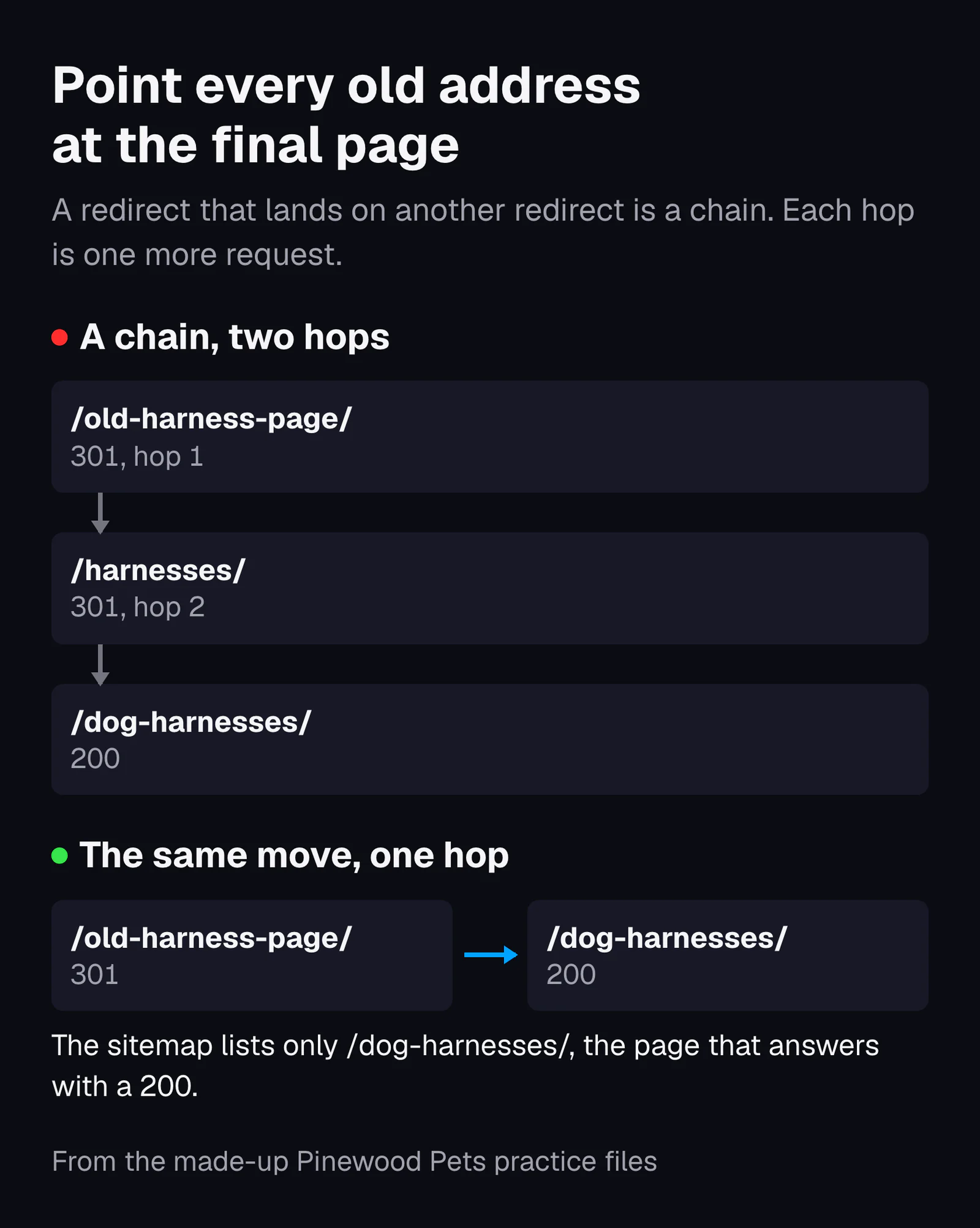
Why a clean sitemap is the first job worth scripting
Three sources, from three directions, agree on what a sitemap should hold:
- Google's guide to building a sitemap says to "include the URLs in your sitemap that you want to see in Google's search results", as full absolute addresses.
- Bing's Webmaster Guidelines say sitemaps should "list only canonical URLs" and "remove deleted or redirected URLs promptly".
- Koray Tuğberk Gübür treats crawl waste as part of what he calls cost of retrieval, the cost to a search engine of crawling and understanding your site. In a 2024 case study his checklist asks you to "ensure 99% of the requests are 200 or 304 status codes", and to have search engines drop "301s and 404s from the crawling patterns" as new pages go live.
A sitemap is the list you hand a search engine on purpose. Every redirect and 404 in it is a request you asked for and did not need. That makes it the cheapest crawl waste to remove, and a good first job to rerun every month.
Job 4: draft redirects for pages you merged
Give Claude Code the list of merged pages and your current redirects, and ask it to check targets, chains and loops before it drafts anything. On the practice list of 7 merges it drafted 4 clean redirects, pointed 1 past a chain to the final page, and left 2 blank instead of guessing.
We merged the pages in data/merged-pages.csv. Draft a 301 redirect from each old URL to the page it merged into. Before you write anything, check three things: that each target is a live 200 page in data/crawl.csv, that no redirect points to a URL that itself redirects (use data/existing-redirects.csv, and point straight at the final page instead), and that nothing redirects to itself. Flag every problem instead of guessing a fix. You have my yes to save a draft to output/redirects-draft.csv with the columns from, to, status, note. This is a draft for me to review, not something to upload. Then summarize.
| Old address | Drafted redirect | Its note |
|---|---|---|
| /blog/cat-litter-odor-tips/, /cat-litter/clumping/, /dog-food/grain-free/, the /amp/ copy | 301 to the page each merged into | Target is 200 in the crawl (4 clean) |
| /old-harness-page/ | 301 to /dog-harnesses/ | The merge list said /harnesses/, which already redirects to /dog-harnesses/; please confirm |
| /dog-harnesses/no-pull-harness/ | Left blank | The target is not in the crawl, so it may not exist yet |
| /summer-sale/ | Left blank | Old and new address are the same, so it would redirect to itself |
The blanks are the result to look for. "Flag every problem instead of guessing a fix" turned two cases where a model could invent an answer into two questions for me. It also spotted an older chain that was not part of the task: /dog-harness/ goes to /harnesses/ and then to /dog-harnesses/. It reported it and left it alone.
Before you upload a draft like this, three checks from the people who define redirects:
- A 301 means the page has moved for good. The HTTP standard, RFC 9110 (2022), defines 301 as "Moved Permanently".
- Google's redirects guide says a permanent redirect is taken "as a signal that the redirect target should be canonical", and its status code page says its crawlers "follow up to 10 redirect hops". Fewer is better: each hop is one more request.
- Bing's guidelines say to use 301 for permanent moves and 302 "only for very short-term changes (less than 2 days)".
After the redirects are live, run job 3 again on the old addresses: each should show one hop and a final 200. Deciding which pages to merge in the first place is its own job, covered in pruning and merging.
What Claude Code can read and change, and how to keep it safe
Claude Code reads files in its folder without asking. In Manual mode it asks before it edits a file, runs a command or uses the web. But since version 2.1.283, a terminal session starts in auto mode wherever your account and model support it, and a second model then approves actions instead of you, according to Anthropic's permission modes page. The first time it happens, a notice at the top of the session says so. If auto mode is not available, the session starts in Manual.
What it can touch in each permission mode
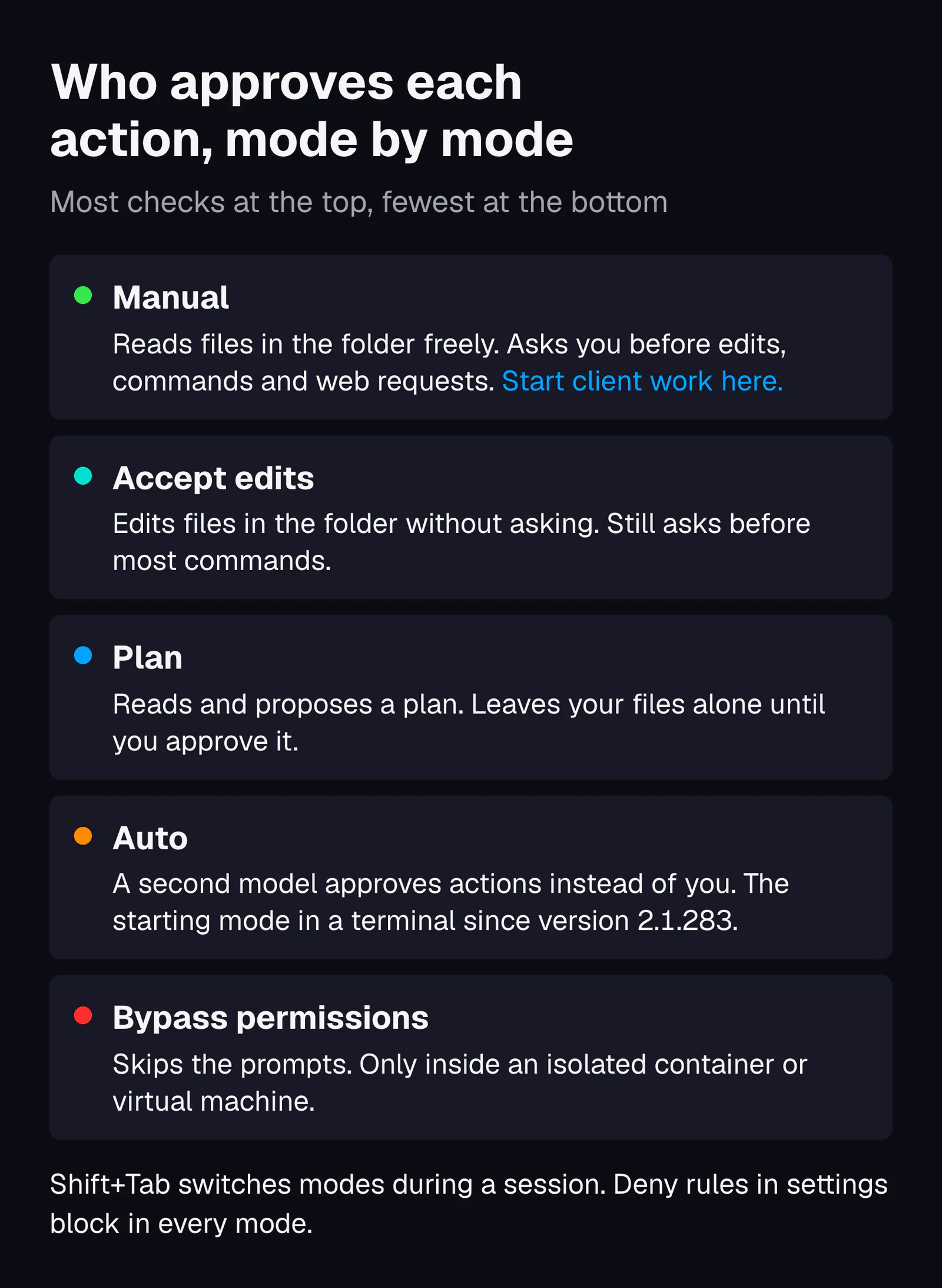
To start in Manual mode, run claude --permission-mode manual, or press Shift and Tab during a session: from auto, the first press switches to Manual, and the status bar then shows "manual mode on". The figure leaves out a sixth mode, dontAsk, which refuses anything that would need a prompt and is meant for scripts. Anthropic says to use bypass permissions only "in isolated environments like containers or VMs where Claude Code can't cause damage". Two more limits from the security page are easy to miss:
- The folder boundary is a question, not a wall: "a Bash command you approve can still write anywhere your user account can". Read the command before you approve it.
- "You're responsible for reviewing proposed code and commands for safety before approval."
Rules that hold even when Claude disagrees
Anthropic's permissions page is clear on the split: "Permission rules are enforced by Claude Code, not by the model. Instructions in your prompt or CLAUDE.md shape what Claude tries to do, but they don't change what Claude Code allows." Put hard rules in a file called .claude/settings.json in the project folder. This is the one in the practice files:
{
  "permissions": {
    "defaultMode": "default",
    "deny": ["Edit(/data/**)", "Read(**/.env)"]
  }
}
The defaultMode part starts every session in that folder in Manual mode (default is Manual's name in settings). The deny rules block edits anywhere in data, and reading any file called .env anywhere in the folder, the usual home of passwords and API keys. I tested the first rule with the CLAUDE.md file moved out of the way, asking it to add a row to the keyword file. The edit was refused with the line "File is in a directory that is denied by your permission settings", and the file stayed byte for byte the same. The .env rule held too: a .env file at the top of a test folder and one in a subfolder were both refused. Names that start with a dot are hidden in Finder and awkward to create in File Explorer, so copy this file from the practice files, or ask Claude Code to create it.
What happens to the data you give it
Your prompts and the file contents Claude reads go to Anthropic to be answered. What happens next depends on your plan, according to Anthropic's data usage page:
- Free, Pro, Max and Ultra: you choose whether your data trains future models. With the setting on, Anthropic keeps it for 5 years; with it off, for 30 days. Check it at claude.ai/settings/data-privacy-controls before you open any client's files.
- Team, Enterprise and API: Anthropic does not train on your prompts or code unless your company opts in, and keeps them for 30 days as standard.
- On your own computer: session transcripts are stored "in plaintext under ~/.claude/projects/ for 30 days by default".
So never paste an API key or a password into a prompt, and never put a client's data in the folder unless your agreement with them allows it to go to a third party. When in doubt, ask the client, or work on an export with the sensitive columns removed.
Review every change before you keep it
Read the file in output before you use it, and the command before you approve it. If an edit goes wrong, press Esc twice or type /rewind to restore files Claude edited. Anthropic's checkpointing page gives the limit: a file that only shell commands changed "isn't tracked and stays as it is". A script that rewrote a CSV cannot be rewound, which is one more reason data stays read-only and new files go to output.
Anything Claude reads can contain instructions written for it, a trick called prompt injection. A 2023 study by Greshake and colleagues, Not what you've signed up for, showed that instructions planted in content an AI tool retrieves, such as a web page, can take over the tool. Anthropic's advice for untrusted content starts with "Review suggested commands before approval". Be most careful in jobs that fetch other people's pages, such as a competitor review.
When a skill or an MCP connector is worth adding
Add a skill when you catch yourself pasting the same instructions for the third time. Add a connector when the data you need lives in a service and changes every day. Until then, exports in a folder are easier to check and safer to share.
A skill is a folder with a file called SKILL.md that holds instructions for one kind of job. Anthropic's skills page suggests making one "when you keep pasting the same instructions, checklist, or multi-step procedure into chat", and keeping SKILL.md under 500 lines. Claude loads a skill's full text only when it is needed, and you can run one by typing its name after a slash. How to write your own, and how to judge one someone else wrote, is in Claude skills for SEO.
An MCP connector links Claude Code to an outside service, such as your search analytics, your web analytics or your site's content system. MCP, the Model Context Protocol, is an open standard for that link. You add one with claude mcp add, following the service's own instructions. Anthropic's MCP page carries a warning worth reading twice: "Verify you trust each server before connecting it. Servers that fetch external content can expose you to prompt injection risk." Its security page adds that Anthropic reviews listed connectors but "does not security-audit or manage any MCP server".
| Your situation | What to add | Why |
|---|---|---|
| You run a job once or twice | Nothing: a prompt and an export | The cheapest setup to check, and nothing to maintain |
| The same rules apply to every job in a project | A line in CLAUDE.md | Loaded every session in that folder |
| The same multi-step job, third time, across projects | A skill | One tested procedure instead of a long prompt typed slightly differently each time |
| Data that changes daily and lives in a service | A connector, read-only where the service allows it | No stale exports, but you now trust a server with your access |
| A rule that must never be broken | A deny rule in settings, or a hook | Enforced by Claude Code, not left to the model's judgment |
A hook is a command Claude Code runs automatically before or after an action; Anthropic's hooks guide shows one that blocks edits to protected files. Search results for this topic often tell you to install a ready-made SEO skill pack first. Anthropic's engineering team, in Equipping agents for the real world with Agent Skills, advises "installing skills only from trusted sources", so read any skill before you install it, the same way you would read a script.
What goes wrong, and how to keep Claude Code honest
Across the four jobs and the extra tests above (on Sonnet 5.5, except the permission tests, which ran on the smaller Haiku 5.5), three things went wrong: chat summaries miscounted in 2 of the 4 jobs, a vague request without a rules file wrote files where I did not want them, and a rule I had not defined was applied loosely. It did not invent a search volume in either test I ran for that.
| Failure | What I saw on 13 November 2026 | The guard |
|---|---|---|
| Invented numbers | Asked for the volume and difficulty of a keyword, once in an empty folder and once in the practice folder where it is not in the data, it said both times that it had no data | "Use only numbers that are in these files" in CLAUDE.md; ask for the file behind every number |
| Miscounted summaries | 12 instead of 14 in job 2; 5 fine and 6 to change, above a table of 6 and 5, in job 3 | Ask for counts from a script, and check they add up to the rows read |
| Over-eager edits | "Fix the duplicate titles." wrote two files into the top folder without asking, when no rules file existed | The plan-first rule, Manual mode, and a deny rule on data |
| Loose definitions | Without the rules file, a hyphen difference was treated as the same title | Define "the same", "missing" and "live" in the prompt |
Do not read my two clean tests as a promise. Anthropic's own guide to reducing hallucinations says its techniques "don't eliminate them entirely. Always validate critical information." The paper Why Language Models Hallucinate (Kalai and colleagues, 2025) explains why: training and tests reward a confident guess over "I don't know". And when Stanford researchers checked answers from AI search engines in 2023, only 51.5% of the generated sentences were fully supported by their citations (Liu, Zhang and Liang, Evaluating Verifiability in Generative Search Engines).
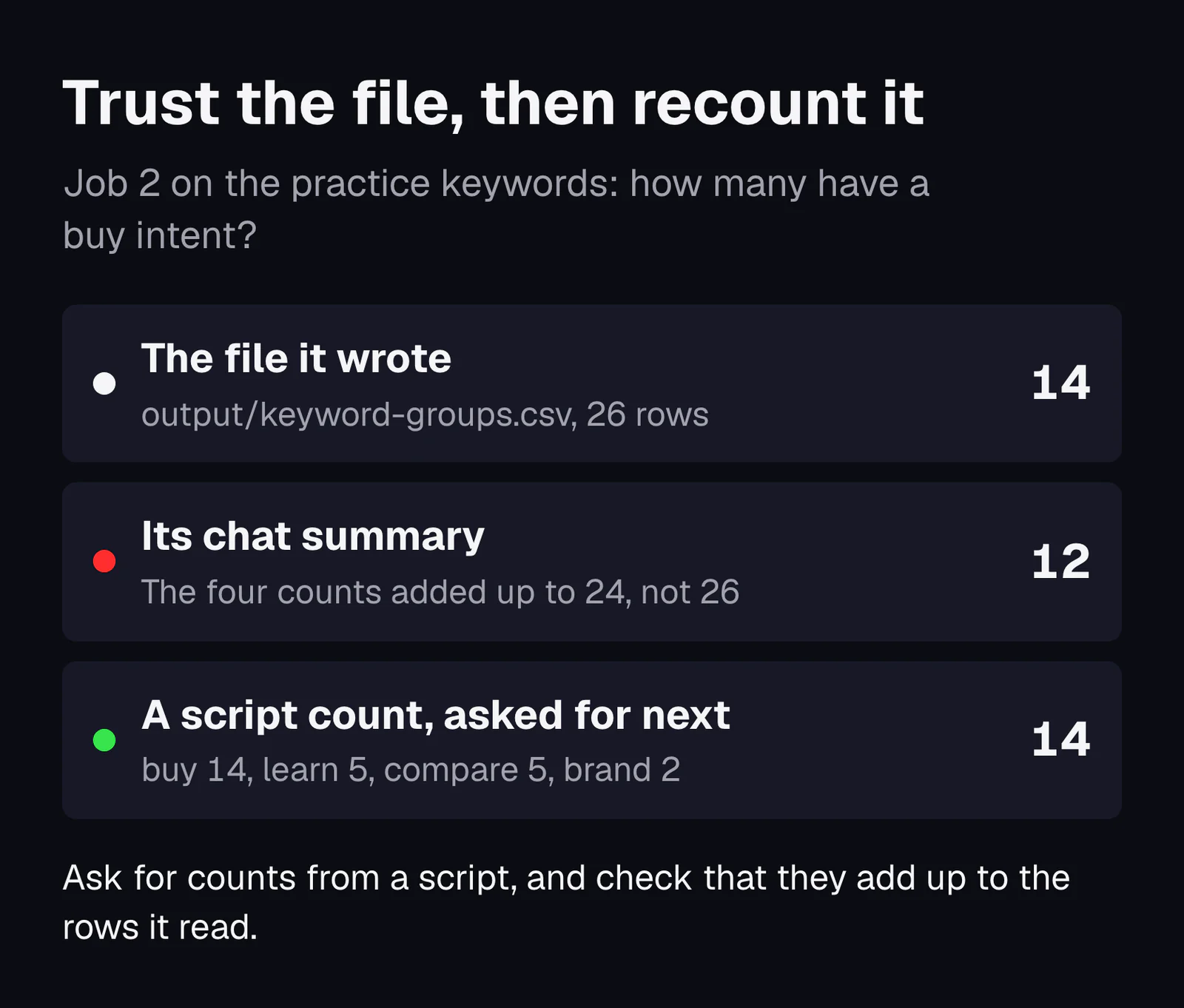
The pattern from these runs is worth keeping: the chat summary is a second piece of work, written after the real work and never checked against it. Treat it as a guide to the file, not as the result. Before a number goes into a report or a client email, open the file, or ask Claude Code to count it with a script and show you the script. For the wider list of what Claude does well and badly in SEO, read Claude for SEO.
Your Claude Code setup checklist
Keep this list. Each line is one thing to do or check, in order.
- Pick a plan with Claude Code (Pro or higher), and check today's price on claude.com/pricing.
- Check that no ANTHROPIC_API_KEY is set, unless you want to pay per use: echo $ANTHROPIC_API_KEY on a Mac, echo $env:ANTHROPIC_API_KEY in PowerShell, and an empty line means you are fine.
- On Windows, install Git for Windows first if you want Claude Code to use Bash; skip it otherwise.
- Install with the official command for your system, then run claude --version in a new window.
- Make one folder per website, with data and output inside.
- Start Claude Code in that folder, sign in, and say yes to trusting it.
- Switch to Manual mode for client work: claude --permission-mode manual, or Shift and Tab.
- Check the data training setting at claude.ai/settings/data-privacy-controls.
- Write a short CLAUDE.md: where files go, numbers only from files, plan before multi-file changes, count the rows.
- Add .claude/settings.json with deny rules for data and for .env files.
- Copy your exports into data unchanged, without data you may not share.
- Run one job at a time, with an exact definition of every rule in the prompt.
- Open the output file and recount any number you plan to use.
- Approve no command you cannot read, and rewind or delete anything that went wrong.
- Add a skill or a connector only when the decision table above says it pays.
Download the Pinewood Pets practice filesZIP, under 6 KB: run the four jobs above on made-up data before you open a real site
With the setup in place, the next job is the big one: build a topical map with Claude, using the same folder, the same rules file and the same habit of checking the output. If you would rather have the map built for you, that is the growth plan.
Sources
- Claude Code overview, Anthropic, 2026
- How Claude Code works, Anthropic, 2026
- Advanced setup (system requirements and install), Anthropic, 2026
- Terminal guide for new users, Anthropic, 2026
- Plans and pricing, Anthropic, 2026
- Use Claude Code with your Pro, Max, or Ultra plan, Anthropic Help Center, 2026
- Manage costs effectively, Anthropic, 2026
- How Claude remembers your project (CLAUDE.md), Anthropic, 2026
- Configure permissions, Anthropic, 2026
- Permission modes, Anthropic, 2026
- Security, Anthropic, 2026
- Data usage, Anthropic, 2026
- Checkpointing, Anthropic, 2026
- Extend Claude with skills, Anthropic, 2026
- Connect Claude Code to tools via MCP, Anthropic, 2026
- Get started with hooks, Anthropic, 2026
- Equipping agents for the real world with Agent Skills, Anthropic, 2025
- Reduce hallucinations, Anthropic, 2026
- Search Console Performance report, Google, 2026
- Influencing your title links in search results, Google Search Central, 2025
- Build and submit a sitemap, Google Search Central, 2026
- Redirects and Google Search, Google Search Central, 2026
- How HTTP status codes affect Google's crawlers, Google, 2026
- Bing Webmaster Guidelines, Microsoft Bing, 2026
- RFC 9110: HTTP Semantics, IETF, 2022
- RFC 2606: Reserved Top Level DNS Names, IETF, 1999
- Achieving Positive Ranking State: 120% growth in 4 months, Koray Tuğberk Gübür, 2024
- Not what you've signed up for: Compromising Real-World LLM-Integrated Applications with Indirect Prompt Injection, Greshake et al., arXiv, 2023
- Why Language Models Hallucinate, Kalai et al., arXiv, 2025
- Evaluating Verifiability in Generative Search Engines, Liu, Zhang and Liang, arXiv, 2023