Claude skills for SEO: what they are and how to write one
A Claude skill is a folder with a SKILL.md file of instructions, and optionally scripts and reference files, that Claude loads only when a request matches the skill's description.
A skill is how you stop pasting the same SEO instructions into Claude. This lesson explains what a skill is from Anthropic's own documentation, read on 13 November 2026, then builds one small SEO skill from nothing: a title and meta description checker. You see the first version fail on live pages, the fix, the full file and a real run. You can download it at the end of the build.

Key takeaways
- Claude keeps only each skill's name and description in view, about 100 tokens a skill, and reads the rest of the skill only when your request matches that description, so the description decides whether the skill is used at all.
- A skill's description works like a search snippet for Claude: write it the way you write a good meta description, saying what the skill does and when to use it, in the words people type.
- Custom skills do not sync between the Claude apps, Claude Code and the API, and the three publish different description limits, so a folder with a lowercase hyphenated name and a description under 200 characters works on all three.
- In my test, the first version of an SEO checker could not read the title or meta description through a page-text fetch tool and wrote rewrites anyway; a 141-line script fixed the reading and the counting, and a rule to ask for the target search first stopped the guessed rewrites.
- Read every file of a skill before you install it: a January 2026 study of 31,132 public skills found at least one vulnerability in 26.1% of them, and skills with scripts were 2.12 times more likely to have one.
What a Claude skill is, and how Claude decides to load one
A Claude skill is a folder with a file called SKILL.md in it. The file holds instructions, and the folder can also hold scripts and reference files. Anthropic launched skills on 16 October 2025 and describes them as "folders that include instructions, scripts, and resources that Claude can load when needed". Its engineering team compares writing one to "putting together an onboarding guide for a new hire".
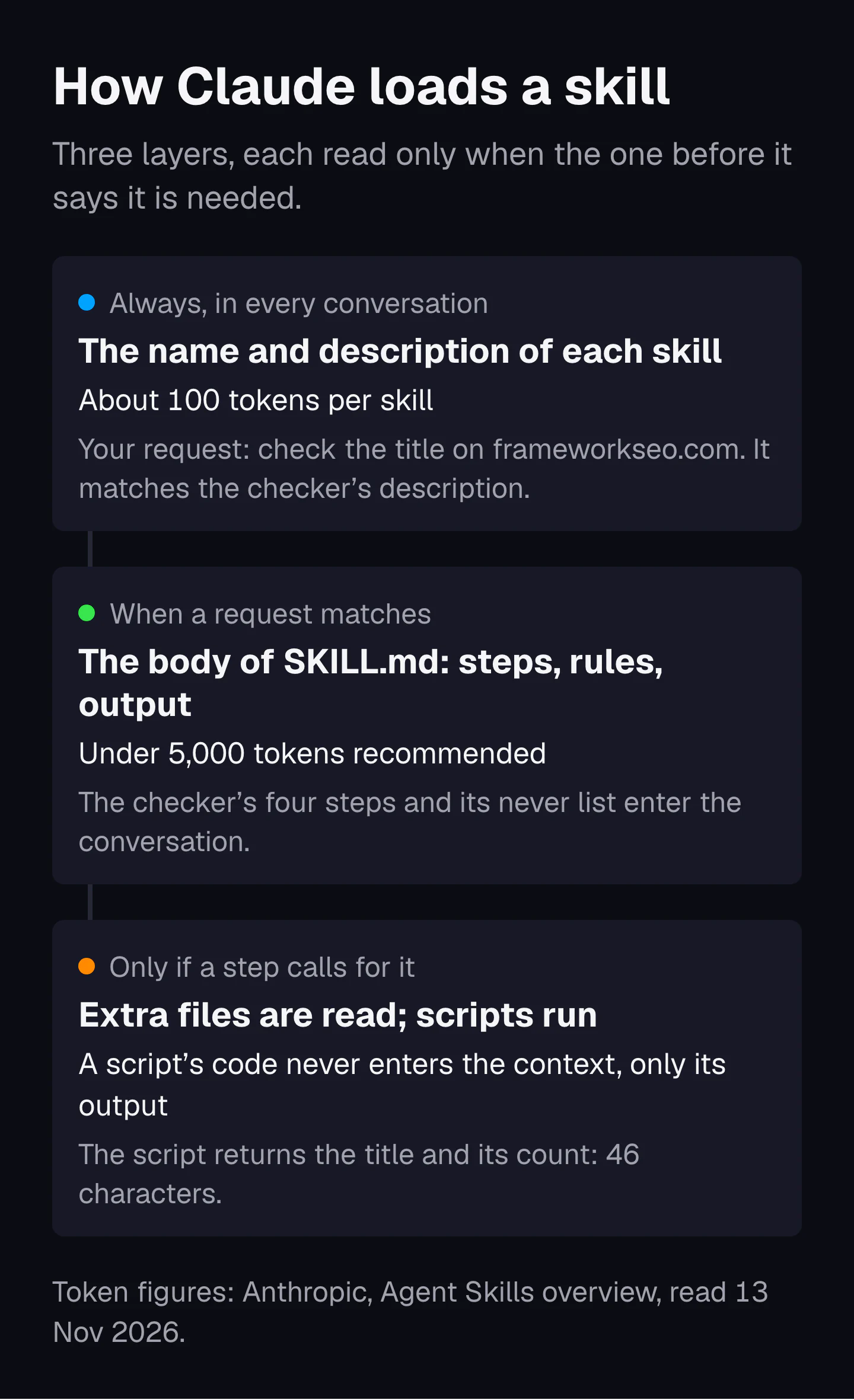
The useful part is how a skill loads. Anthropic's Agent Skills overview names three levels, and I read the figures on 13 November 2026:
- Always: the name and description of every installed skill sit in Claude's context, about 100 tokens per skill.
- When a request matches: Claude reads the body of SKILL.md. Anthropic recommends keeping it under 5,000 tokens.
- Only when needed: Claude reads the extra files a step points to, and runs bundled scripts. A script's code never enters the context. Only its output does.
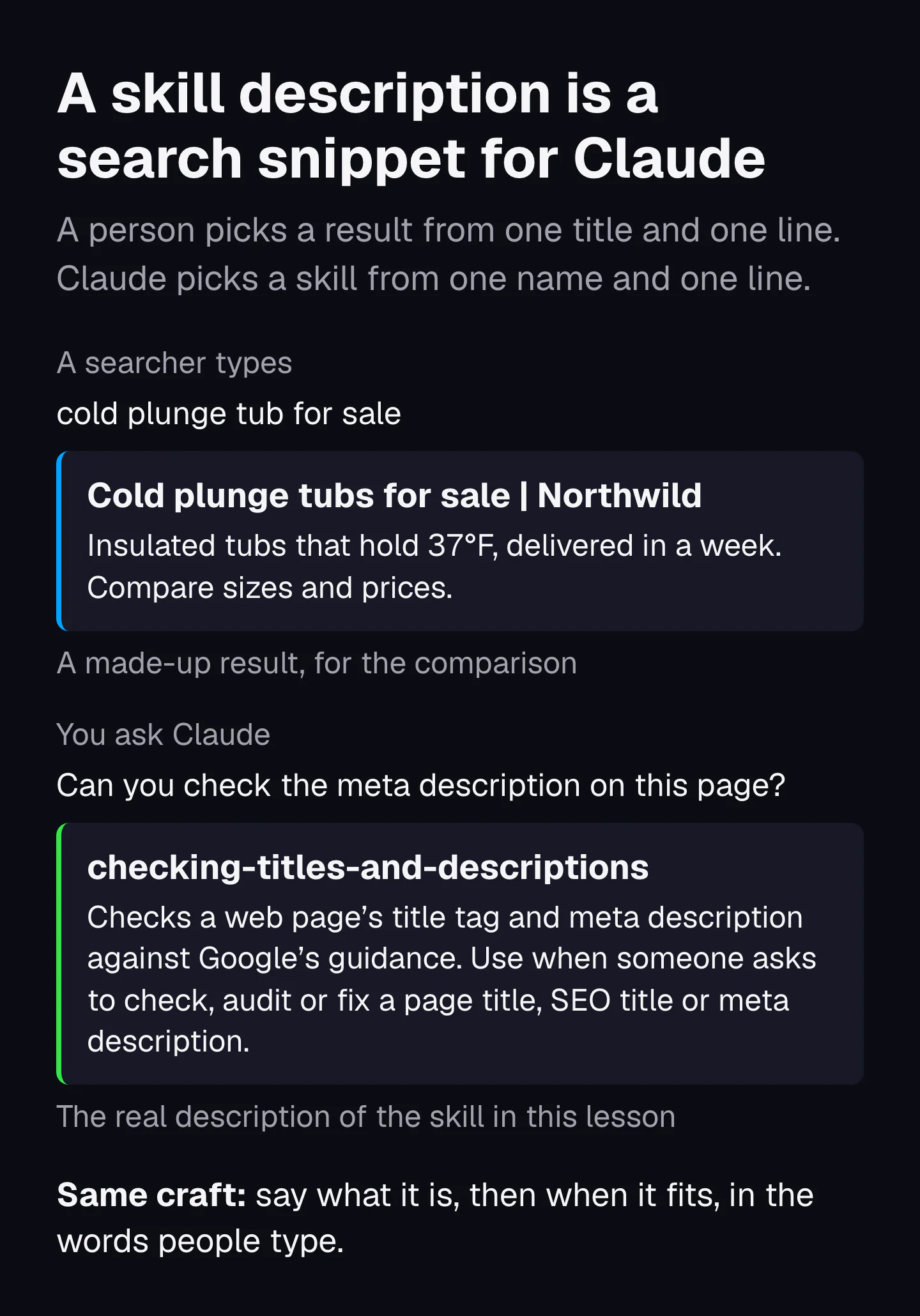
That design has a consequence none of the five ranking guides I read mentions. The description is the only part Claude sees when it decides whether to use your skill. Anthropic puts it plainly: the description "is what Claude matches your request against", so it "must say both what the Skill does and when to use it".
If you do SEO, you already know this job. A searcher picks a result from one title and one line of snippet. Claude picks a skill from one name and one line of description. So the craft of a good meta description, saying what the page is and who it is for in the words people type, is the craft of a good skill description. That is also why the example skill in this lesson checks titles and meta descriptions: it is a skill about the same kind of line that makes a skill work.
One narrow job per skill is not a new idea in SEO. Koray Tuğberk Gübür, whom Jason Barnard credits with making the topical map a standard SEO deliverable, wrote in June 2024 that he had built "over 287 different GPT Agents" for semantic SEO; the ones he lists are each named for one task, such as a Query Gap Analyzer and a Contextless Word Remover. Skills reward the same habit: a narrow skill has a precise description, and a precise description gets picked for the right requests. His framework is explained in Koray Tuğberk Gübür's topical map framework. Where Claude helps with SEO in general, and where it gets things wrong, is in Claude for SEO.
Where Claude skills work: the apps, Claude Code and the API
Custom skills work in three places: the Claude apps, Claude Code and the Claude API. They do not sync between them. Anthropic's overview says it in bold: "Custom Skills do not sync across surfaces". A skill you upload to claude.ai is not in your API workspace, and neither is in Claude Code.
| Where | Where the skill lives | How you add it | Network for scripts | Who can use it |
|---|---|---|---|---|
| Claude apps (claude.ai, desktop) | Your account | Zip the folder, then Customize, Skills, Upload a skill. Code execution must be on | Depends on your settings: full, partial or none | You, unless you share it (Team and Enterprise) |
| Claude Code | ~/.claude/skills/<name>/ for you, .claude/skills/<name>/ for one project | Copy the folder in. No upload | The same as any program on your computer | You, or everyone who has the project |
| Claude API | Your workspace | Upload through /v1/skills, then call it with the code execution tool | None | Everyone in the workspace |
Two details in that table decide how you write a skill. The first is network access. A skill that fetches a live web page works in Claude Code, may work in the apps, and cannot work through the API. So an SEO skill that reads pages needs a fallback, such as asking you to paste the HTML. The example skill below does that.
The second is the limits, because Anthropic's own pages do not agree. The Agent Skills specification allows a description of up to 1,024 characters. The Help Center article on creating skills gives 200 characters for the apps. Claude Code cuts the description, together with an optional when_to_use field, at 1,536 characters in its list of skills. The Help Center also lists every plan from Free upward, while the API overview lists Pro and up for custom skills in the apps. Check your own settings before you rely on either.
Since 18 December 2025 the format is an open standard, published at agentskills.io, so other AI tools can read the same folder. Setting up Claude Code for SEO work, including where skills sit beside your project notes, is covered in Claude Code for SEO.
How a skill differs from a prompt, a project and an MCP connector
A prompt is one request. A project is background material loaded into every chat inside it. An MCP connector gives Claude access to data and tools. A skill is a method that Claude loads only when a task calls for it. They are not rivals; they stack.
| Thing | When Claude sees it | What it carries | SEO example |
|---|---|---|---|
| Prompt | This conversation only | One request and its context | "Suggest five titles for this page." |
| Custom instructions | Every conversation | How you like Claude to answer | "Use American spelling and short sentences." |
| Project | Every chat inside the project | Files and background knowledge | A client's brand guide and their topical map |
| MCP connector | When Claude calls one of its tools | Access to outside data and actions | Search Console data, a crawler, your CMS |
| Skill | Name and description always; the rest only when a request matches | A repeatable method, rules and scripts | The title and meta description checker in this lesson |
Anthropic's Help Center draws the same lines. Projects "provide static background knowledge that's always loaded", while skills "activate dynamically when needed". For MCP, the Model Context Protocol, the open standard for connecting AI applications to outside systems, the Help Center puts it this way: "MCP connections give Claude access to tools, while skills teach Claude how to use those tools effectively."
For SEO that means a sensible setup has all of them. The project holds the client's facts. A connector brings in Search Console data. A skill holds the checks you run on that data every month. The prompt is the one thing you type today.
How to write a skill: the folder, the two fields and the body
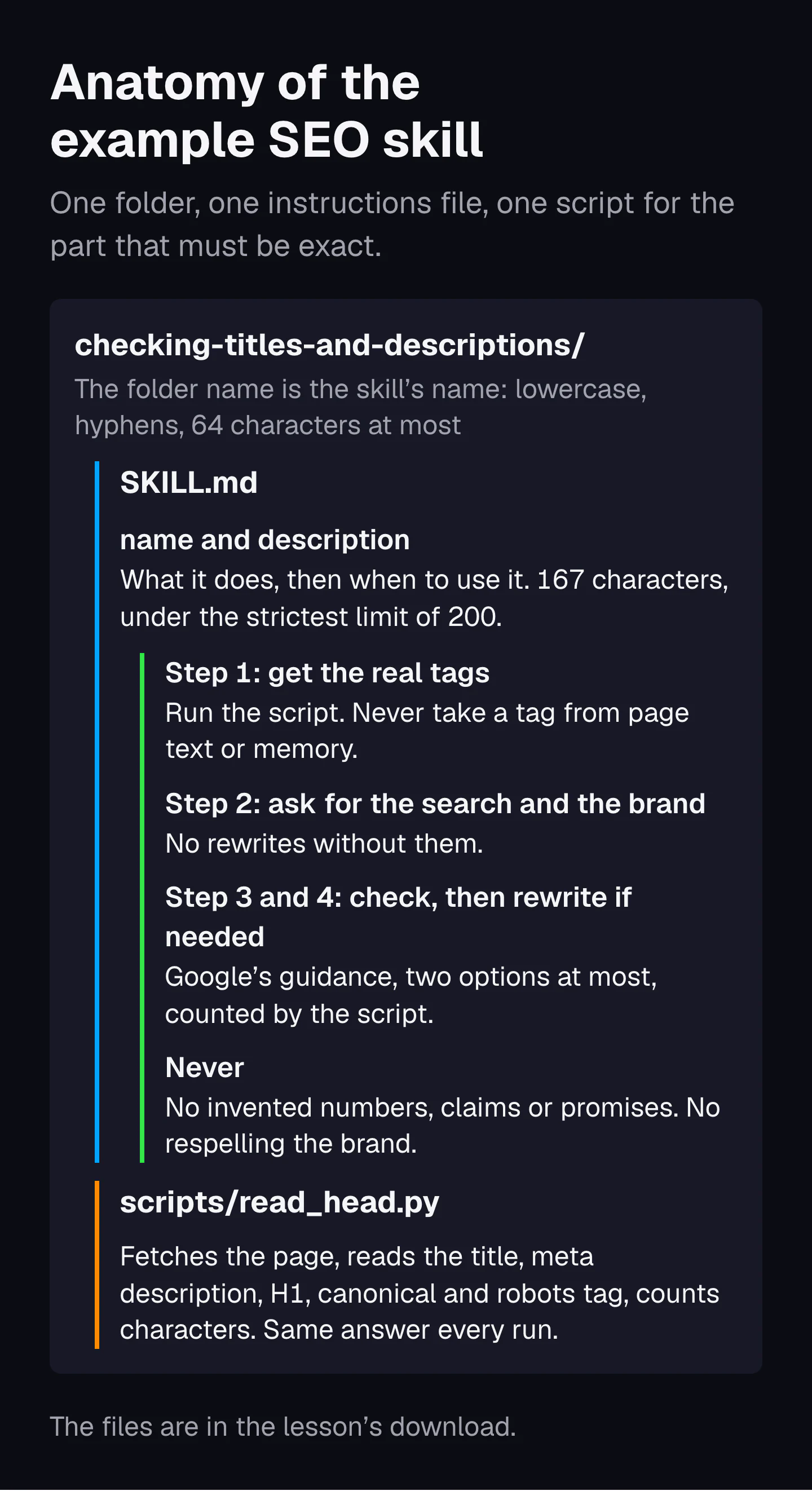
To write a skill, make a folder named for the job, put a SKILL.md file in it that opens with a name and a description, and write the steps, rules and output Claude should follow. Add a script only for a step that must give the same answer every time. These are the steps I follow, in Anthropic's order:
- Pick one job. The Help Center's advice is a skill "focused on one workflow rather than trying to do everything". "Check titles and meta descriptions" is one job. "Do my SEO" is not.
- Run the job without a skill first. Anthropic's best practices say to build evaluations before the instructions: three real requests, run without the skill, noting where Claude falls short. Those gaps are what the skill is for. I skipped this for the example below, and the first version failed the way that predicts.
- Make the folder. Its name is the skill's name. The specification says the name "must match the parent directory name". Anthropic suggests a name that starts with an -ing verb, such as
checking-titles-and-descriptions. - Write the two fields. SKILL.md starts with three dashes, a
name:line, adescription:line and three more dashes. The description says what the skill does, then "Use when" and the words a person would type. - Write the body. State what to ask the user for, the steps, the rules, what never to do and the output format. Anthropic's default assumption is that "Claude is already very smart", so leave out anything Claude knows and keep the body under 500 lines.
- Add a script for anything that must be exact. Counting characters, reading HTML and checking a file format are jobs for code. Anthropic's rule for scripts is "Solve, don't defer": handle the errors in the script instead of leaving them to Claude.
- Test it in a fresh session. Claude Code's documentation explains why: leftover context from writing the skill "will mask gaps in the written instructions".
- Install it. Copy the folder into Claude Code, or zip it for the apps. The zip must contain the folder itself, not the files loose at its root.
Keep any extra reference files one level away from SKILL.md. Anthropic warns that when one reference file points to another, Claude may read only the first part of the second.
Build an SEO skill: version one, and what went wrong on real pages
My first version of a title and meta description checker loaded when it should, then failed on all three live pages I gave it. It could not read the tags, and it wrote rewrites anyway. Here is the whole first version, the kind of file most people write first:
---
name: checking-titles-and-descriptions
description: Checks the title tag and meta description of a web page and suggests better ones.
---

1. Open the page the user gives you.
2. Find the title tag and the meta description.
3. Check the title: it should be 50 to 60 characters, include the main keyword near the start, and end with the brand name.
4. Check the description: it should be 150 to 160 characters, include the keyword and a call to action.
5. Write a better title and a better description.
6. Show the results in a table.
How I tested it
I ran it on 13 November 2026 in a clean Claude Code session that loaded only this skill and Claude Code's built-in ones, with Claude Sonnet (claude-sonnet-5-5). The session could use the skill, the fetch tool and Python; a plain download with curl needed an approval the unattended run could not give, so the fetch tool was the only way left to read a page. Four requests, each in a fresh session: check the Wikipedia article on search engine optimization, ask whether the title of Google's own page on title links is too long, check our own homepage, and a plain question about the difference between a title tag and an H1.
What went right
The description did its job. Claude loaded the skill for all three checking requests and left it alone for the plain question. A vague description is the most common reason a skill never runs, and this one was specific enough.
What went wrong
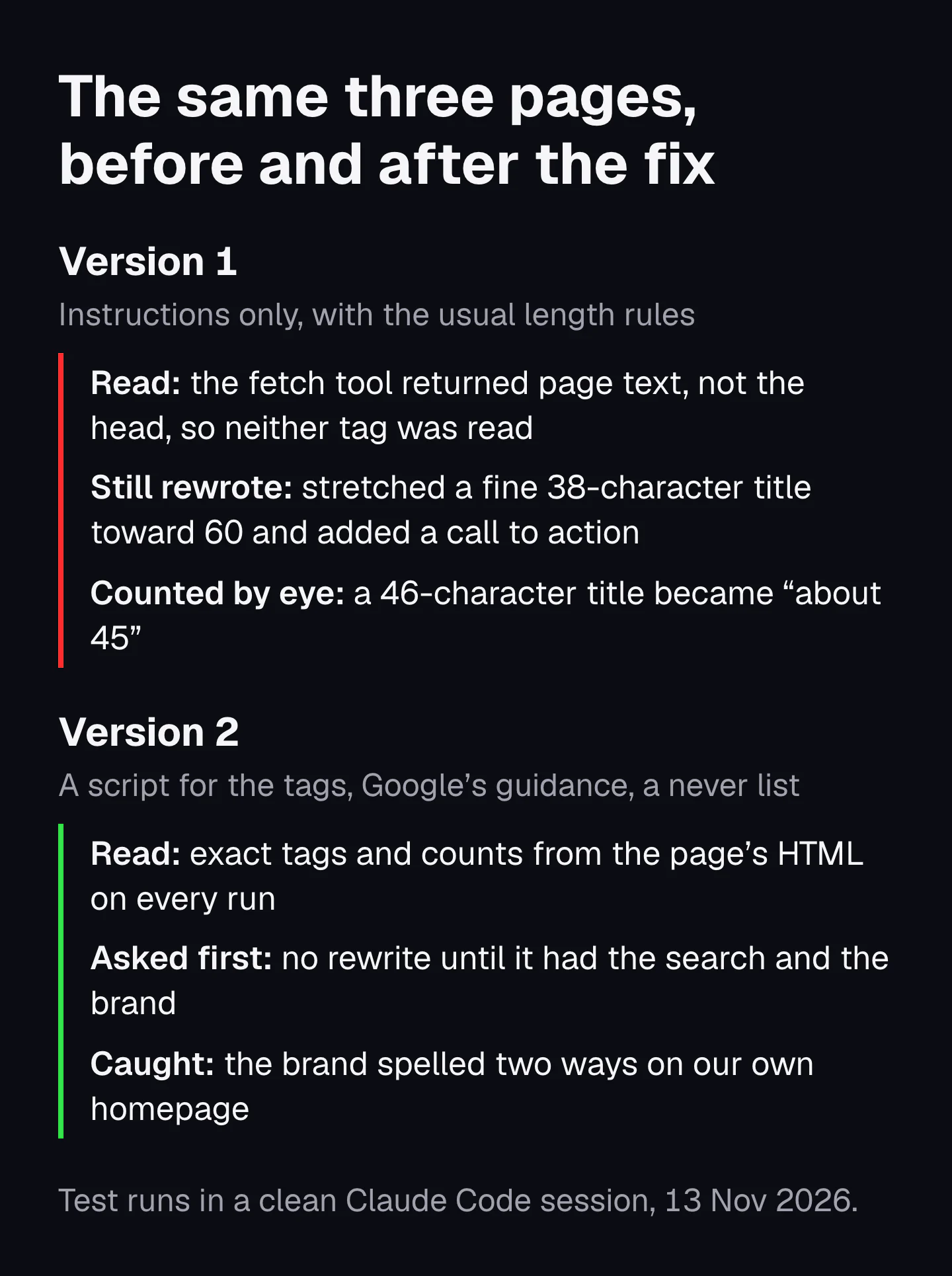
- It could not see the tags. The fetch tool returned the page as text, without the HTML head where the title and meta description live. On Google's page the fetch tool answered: "The content you provided doesn't include the page's HTML <title> tag or its meta description tag."
- It rewrote anyway. On Wikipedia it called the 38-character title too short for its 50 to 60 target, proposed a 70-character replacement, and suggested a description ending "Read the full article." Wikipedia publishes no meta description at all, which the first version could not tell from the page text.
- It counted by eye. Our homepage title has 46 characters. The first version said "about 45".
- It obeyed rules that are not Google's. The keyword-first rule made it add "SEO" to our title without asking what search the page should be found for.
The length rules were the deeper mistake, and I wrote them in myself. Google's documentation says there is no limit on how long a <title> element can be, and none on meta descriptions; both are cut in results "as needed, typically to fit the device width". Google's own page on title links has a 104-character title. A skill repeats your mistakes on every page it touches, which is the best reason to source each rule before it goes in the file.
Fix the instructions: version two, the full file and a real run
Version two reads the tags with a small script, asks for the search and the brand before it rewrites anything, checks against Google's guidance instead of length rules, and lists what it must never do. Each fix answers one failure from the first run.
The script
The script, scripts/read_head.py, is 141 lines of Python that use only the standard library. It fetches the page, reads the title, the meta description, the first H1, the canonical and the robots tag, and prints them as JSON with exact character counts. It skips a title tag inside an icon, a trap for a hand-written search. It can also read saved HTML with --file, for places where scripts have no network. It needs Python 3, and it reads the HTML the server sends without running JavaScript, so a title or H1 that a script adds later is not seen. A third option, --count, counts suggested rewrites. I added that one after a later test, described below.
The full SKILL.md
This is the final file, word for word. The download holds the same file with its script.
---
name: checking-titles-and-descriptions
description: Checks a web page's title tag and meta description against Google's guidance. Use when someone asks to check, audit or fix a page title, SEO title or meta description.
---

# Checking titles and descriptions

## Step 1: get the real tags, never guess them

Run `python3 scripts/read_head.py <url>` from this skill's folder, once per URL. It prints the title, the meta description, the first H1, the canonical and the robots tag as JSON, with exact character counts.

- If it prints an `error`, or you cannot run scripts here, ask the user to paste the page's HTML (in the browser: View source, copy all). Save it and run `python3 scripts/read_head.py --file <saved file>`.
- Never take the title or description from a fetch tool that returns page text, from memory, or from the visible headline. If you could not read a tag, say "not read" and stop there for that tag.

## Step 2: ask for what only the user knows

Before you suggest a new title or description, you need two things. Ask for any you do not have, in one message:

1. The search the page should be found for (for example "cold plunge tub for sale").
2. The brand name, spelled the way the business spells it.

If the user does not know the search, check the page anyway and write no rewrites.

## Step 3: check each tag

Title:
- Missing or empty: fix first. More than one title: say which ones.
- Vague ("Home", "Untitled", the brand alone on a page that is not the home page): flag it.
- The same word or phrase repeated: flag it as stuffing.
- The words that answer the search should come before the brand, so that if Google cuts the end of a long title, only the brand is lost.
- Compare it with the first H1. If they describe different things, say so: Google uses headings as one source when it writes its own title link.
- Report the character count. Google sets no length limit; it cuts titles to fit the screen. Never call a length a Google rule.

Meta description:
- Missing: say that Google will build the snippet from page text, and offer one.
- It should sum up this page, not the whole site, and not be a list of keywords.
- If the user gave several URLs, flag descriptions that are the same or nearly the same.
- Report the character count, with the same caution as for titles.

## Step 4: suggest a rewrite only when it is needed

At most two options per tag. Use only facts that appear on the page or that the user gave you.

Count every rewrite with `python3 scripts/read_head.py --count "<text>" "<text>"` before you show it. Never estimate a count or write "about".

## Never

- Never invent a search volume, a ranking, a click-through rate or a "best" length.
- Never put a price, discount, guarantee, year or claim in a rewrite unless the page states it.
- Never respell the brand. Use the spelling the user gave you; if the page spells it another way, point that out.
- Never promise that Google will show the new title or description: it chooses title links from several sources and builds most snippets from page text.

## Output

For each URL, a table with these columns: tag, what the page has now, characters, verdict (keep, improve or fix), why. Then the rewrites, if any, each with its character count. End with what you could not check.
Download the skill (ZIP)The folder with SKILL.md and scripts/read_head.py, ready to upload to the Claude apps or unzip into Claude Code. 4 KB.
Download SKILL.md on its ownThe plain instructions file, to read before you install anything.
To use it in Claude Code, unzip it so the folder sits at ~/.claude/skills/checking-titles-and-descriptions/, with SKILL.md and scripts/read_head.py inside. Then ask in plain words, for example "check the title and meta description on this page", or type /checking-titles-and-descriptions. In the Claude apps, upload the ZIP in Customize, Skills, with code execution on.
A real run on our own homepage
I gave the final file this request in a fresh session, on Claude Haiku, the smallest model: check the SEO title and description of frameworkseo.com, the page should be found for "seo growth plan", the brand is FrameworkSEO. It ran the script, then answered with this table (the why column condensed in my words):
| Tag | What the page has now | Characters | Verdict | Why |
|---|---|---|---|---|
| Title | Growth plan for your site, $29 | Framework SEO | 46 | Fix | The search is not in it, and "Framework SEO" is spelled differently from the brand |
| Meta description | Every page your website needs to rank on Google and get recommended by AI, in the order to publish them. Delivered in 3 business days. Grow or get your money back. | 163 | Improve | It describes the page well but never uses the search |
| H1 | More traffic and sales from Google and AI, from a plan built in 3 days | Not counted | Consider | Google can draw its title link from the H1, so it is worth aligning with the title |
Its rewrites, each counted by the script: "SEO Growth Plan for Your Site, $29 | FrameworkSEO" (49 characters), "SEO Growth Plan: Every Page to Rank on Google and AI | FrameworkSEO" (67), and a 151-character description that dropped the money-back line, with a note to keep it if we want it shown. It ended with what it could not check: rankings, search volume and competing pages. I have not changed our homepage; the run shows what the skill does, not what we will publish.
The brand catch is real. Our homepage title says "Framework SEO" with a space, and the business is FrameworkSEO. Nobody asked the skill to look for that. Two more results from version two on Sonnet, which differed from the final file only in the two later fixes below: on Wikipedia it read the 38-character title, called it a keep, found no meta description, and asked for the search before writing one. On Google's title link page it read the 104-character title and spotted a grammar slip in the description: "an SEO-rich titles".
The second fix, found on a smaller model
Before the --count option existed, a Haiku run (claude-haiku-5-5) gave one of its own rewrites as 73 characters. It had 74. Sonnet had counted with code on its own; Haiku had not. Anthropic's best practices say to test with every model you plan to use, and this is why: a smaller model shows the gaps a larger one fills by itself. The fix was one counting rule in the file and six lines in the script. The next Haiku run, with that fix in, showed a second gap: my line "never change how the brand name is spelled" was ambiguous, and Haiku kept the page's spelling instead of mine. The final rule says to use the user's spelling and point out the page's.
What makes an SEO skill good: your facts, your checks and a never list
A good SEO skill carries the facts and checks you would apply yourself, asks for the data it cannot see instead of guessing, says plainly what it must never do, and has been tested on real pages with more than one model. Each of those is a line in the example file, and each one came from a failure in the test.
- It carries your facts and your checks. The first version carried folklore: 50 to 60 characters, a call to action in every description. The second carries Google's published guidance and says where each rule comes from. Your own skill should carry the rules you would defend to a client, not the ones every list repeats.
- It asks for data instead of guessing. Claude cannot know which search a page should be found for, or how a brand spells itself. The second version asks, and writes no rewrites without an answer. The same goes for search volumes and rankings: Claude has none unless you give it an export or connect a data source.
- It says what it must never do. The never list is the part that stops a skill from doing harm at scale: no invented numbers, no claims the page does not make, no respelled brand, no promise about what Google will show.
- It puts exact work in code. Reading HTML and counting characters gave the same answer on every run once a script did them. A model doing them by eye was close, and close is wrong in a title tag.
How to test your own
- Write three real requests that should load the skill and one that should not.
- Run each in a fresh session with the skill, and once without it, so you can see what the skill adds.
- Read the tool calls, not only the answer: did it run the script, or improvise?
- Repeat on the smallest model you will use.
- Fix the instructions where it went wrong, and run the same requests again.
A pass means the skill loaded on the right requests and only those, the script ran, the table came back, and nothing in it was guessed.
One limit to know: Claude Code's documentation says a rule that must hold every single time belongs in a hook, a script Claude Code runs on an event, not only in a skill. A skill is followed with judgment. A hook runs regardless.
What to check before you install a skill from a public repository
Read every file of a skill before you install it, because a skill is instructions and code that run with your access. Anthropic's overview says to use skills "only from trusted sources: those you created yourself or obtained from Anthropic". The read-through below is for when you install one from anywhere else anyway. The same page warns that "a malicious Skill can direct Claude to call tools or run code in ways that don't match the Skill's stated purpose."
Two studies measured how common the problem is:
- Agent Skills in the Wild (Liu and colleagues, January 2026) collected 42,447 skills from two marketplaces and analyzed 31,132. 26.1% had at least one vulnerability, and 5.2% showed patterns that strongly suggest malicious intent. Skills that bundle scripts were 2.12 times more likely to be vulnerable than skills with instructions only.
- ToxicSkills (Snyk, February 2026) scanned 3,984 skills from two public registries. 36.82% had at least one security flaw and 13.4% had a critical one.
None of the five ranking guides I measured for "claude seo skills" mentions either risk. Most of them are lists of skills to install.
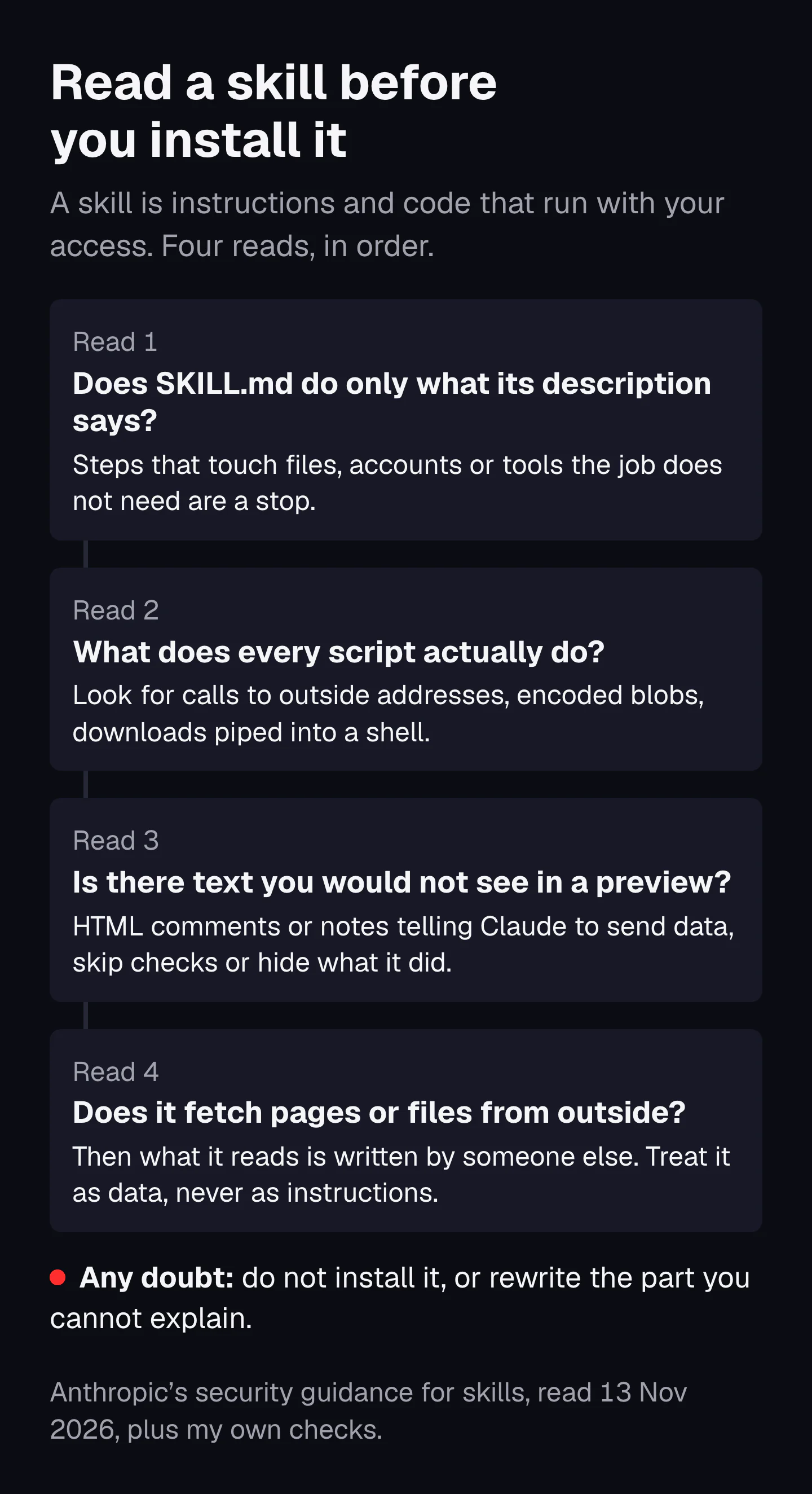
The read-through
- Read SKILL.md in full. Does it do only what its description says? A title checker has no reason to read your files, your email or your keys.
- Read every script. Anthropic's list of things to look for: "unexpected network calls, file access patterns, or operations that don't match the Skill's stated purpose." To that I add two of my own stops: long encoded strings, and a download piped straight into a shell.
- Look for text a preview hides. HTML comments in a Markdown file do not show when the file is rendered. Open it as plain text.
- Check the permissions. An
allowed-toolsline lets a skill use tools without asking you. It should name only what the job needs. - Ask whether it fetches outside content. Anthropic calls skills that fetch from external URLs a particular risk, because "fetched content might contain malicious instructions". Researchers have shown that text planted in web pages can reliably push products up in AI search answers (Pfrommer and colleagues, 2024).
I do not link to skill marketplaces here, and that is on purpose. Many of them sell SEO services or SEO skills, and a list of them would not make the read-through any shorter.
Which SEO jobs deserve a skill, and which a one-off prompt
Give a job a skill when you will repeat it with the same checks, or when it needs your own facts every time. Use a one-off prompt when you do the job once, or when the judgment changes each time. Claude Code's documentation puts the trigger simply: create a skill "when you keep pasting the same instructions, checklist, or multi-step procedure into chat".
| SEO job | How often | What it needs | Verdict |
|---|---|---|---|
| Check titles and meta descriptions | Every new or changed page | Exact tags, fixed rules | Skill, with a script |
| Suggest internal links from a list of your URLs | Every new page | Your URL list and your linking rules | Skill; you supply the list each time |
| Write a content brief in your format | Every page you plan | Your brief template and the research | Skill |
| Summarize a monthly Search Console export | Monthly | The export, the same questions each month | Skill |
| Check that robots.txt lets the AI crawlers you want in | After every site change | The file and a fixed list of crawler names | Skill |
| Read one competitor's page | Once | Judgment about this page | Prompt |
| Brainstorm angles for one article | Once | Ideas, not checks | Prompt |
| Decide what a site's topical map should cover | Once per site | A person's decisions about the business | Prompt help; a skill only for the format and checks |
Three of those rows have their own lessons. Briefs are in content briefs with Claude. The linking rules a link skill would carry are in internal links in a topical map. And what Claude can and cannot decide about a map is in build a topical map with Claude.
We run our own skills, built on our own framework, and they stay ours. If what you want is the finished map rather than a skill that helps you build one, that is the growth plan.
Common questions
Do Claude skills work in other AI tools?
The format has been an open standard since 18 December 2025, published at agentskills.io, so other tools can read the same folder. Keep to the six fields the standard allows (name, description, license, compatibility, metadata and allowed-tools) and the skill stays portable. Claude Code-only features, such as running a command inside the skill text, do not work elsewhere.
Can a Claude skill see my rankings or search volumes?
No, not by itself. Claude has no ranking or search volume data unless you give it an export or connect a data source through an MCP connector. A good SEO skill says so and asks for the export instead of guessing numbers.
Do I need to know how to code to write a skill?
No. A skill can be a SKILL.md file of plain Markdown instructions, and Anthropic's Help Center article on what skills are says simple skills need no coding. Scripts are optional and help only where a step must give the same answer every time, such as counting characters.
Sources
- Agent Skills overview, Anthropic, 2026
- Skill authoring best practices, Anthropic, 2026
- Extend Claude with skills (Claude Code docs), Anthropic, 2026
- Equipping agents for the real world with Agent Skills, Anthropic, 2025
- Introducing Agent Skills, Anthropic, 2025
- What are skills?, Claude Help Center, 2026
- How to create custom skills, Claude Help Center, 2026
- Use skills in Claude, Claude Help Center, 2026
- What are projects?, Claude Help Center, 2026
- Agent Skills specification, Agent Skills, 2025
- What is the Model Context Protocol?, Model Context Protocol, 2026
- Koray's Agents (Generative AI Agents for Semantic SEO and Topical Authority), Koray Tuğberk Gübür, Medium, 2024
- Agent Skills in the Wild: An Empirical Study of Security Vulnerabilities at Scale, Liu, Wang, Feng, Zhang, Xu, Deng (arXiv), 2026
- ToxicSkills: malicious AI agent skills, Snyk, 2026
- Ranking Manipulation for Conversational Search Engines, Pfrommer, Bai, Gautam, Sojoudi (arXiv), 2024
- Influencing your title links in search results, Google Search Central, 2025
- Control your snippets in search results, Google Search Central, 2026