Internal links inside a topical map: who links where
An internal link is a link from one page of a website to another page of the same website, and in a topical map it is the planned relation between two pages: which page points to which, where on the page, and in what words.
A topical map is a list of pages until the links go in. Here is how I plan them: the direction of every link, where it sits on the page, the words it carries, the pages that do not exist yet, and one real branch, link by link.

Key takeaways
- In a topical map every page links up to the page it sits under, across to a neighbor only when the two share a reason a reader would act on, and over to the page that sells what it talks about.
- Google's reasonable surfer patent (filed 2004) weights a link by how likely a reader is to follow it and lists the link's position, font size and words as features, so plan links in the main content, inside a sentence that gives the reason.
- A planned link to a page that is not live yet waits: it goes in, in both directions, on the day the later page goes live, and until then the page links to the live page above it.
- The often quoted 45 to 50 link point comes from a 2022 study of links pointing into one page, not links on a page; Koray Tuğberk Gübür's test sites in 2021 used at most 15 links a page.
- A strict silo gets the grouping right but walls pages in: a split test published in 2021 found that links between neighboring pages, the six nearest location pages, lifted the linked pages' organic traffic by 7%.
How internal links turn a list of pages into a map
An internal link is a link from one page of your site to another. In a topical map it is the planned relation between two pages: which page points to which, where on the page, and in what words. The rows of a map are the pages. The links are what makes those rows one subject instead of a pile of posts.
In the HTML, an internal link is an ordinary anchor element that points at another address on the same domain:
<p>If the water has reached the basement, see our <a href="/flooded-basement-cleanup/">flooded basement cleanup</a> page.</p>
The address and the page are made up for the example. The words between the tags are the anchor text. A link from another website to yours is a backlink, and that is a different job, covered in links, mentions and reputation.
Three jobs a link does for a search engine
- It lets the page be found. Google's link best practices (updated December 2025) put it in one line: "Every page you care about should have a link from at least one other page on your site."
- It passes weight. In their 1998 paper, Sergey Brin and Larry Page described PageRank as a "random surfer" who "keeps clicking on links". In 2025 a US court quoted notes from an interview with a Google engineer describing PageRank as "a single signal relating to distance from a known good source" (US v. Google remedies opinion, 2 September 2025). Your own links are part of that path.
- It describes the page it points to. The same 1998 paper says "anchors often provide more accurate descriptions of Web pages than the pages themselves." A Google slide from 2017, shown at the antitrust trial, still listed anchors as one of "The 3 Pillars of Ranking": "What the Web says about the document" (trial exhibit UPX0004).
Koray Tuğberk Gübür, who introduced the topical map as an SEO plan in February 2021, adds the condition that matters inside a map. A link between two pages needs a shared idea he calls a contextual bridge, "because, without a proper contextual bridge, the internal links can't pass relevance" (holisticseo.digital, January 2023). His wording leans on a theory of how Google weighs links. The practical rule is plain: every link in a map exists for a reason you can write down.
If you have not built a map yet, start with how to build a topical map, step by step. Its step 7 plans the links for a made-up salon; this lesson goes deeper on every rule it uses.
Which page links to which: up, across and over
Every page links up to the page it sits under, across to a neighbor only when the two share a reason a reader would act on, and over to the page that sells what it talks about. Hubs and pillars also link down to every page under them. That is the whole direction rule.
| Direction | From | To | When |
|---|---|---|---|
| Up | Every page | The page it sits under in the map | Always, one link |
| Down | A hub or pillar | Every page under it | Always, a short summary and a link each |
| Across | Any page | A neighbor, in the same branch or another | Only when you can write the reason in one line |
| Over | A page that teaches | The page that sells the thing it talks about | Whenever that page is not already the parent |
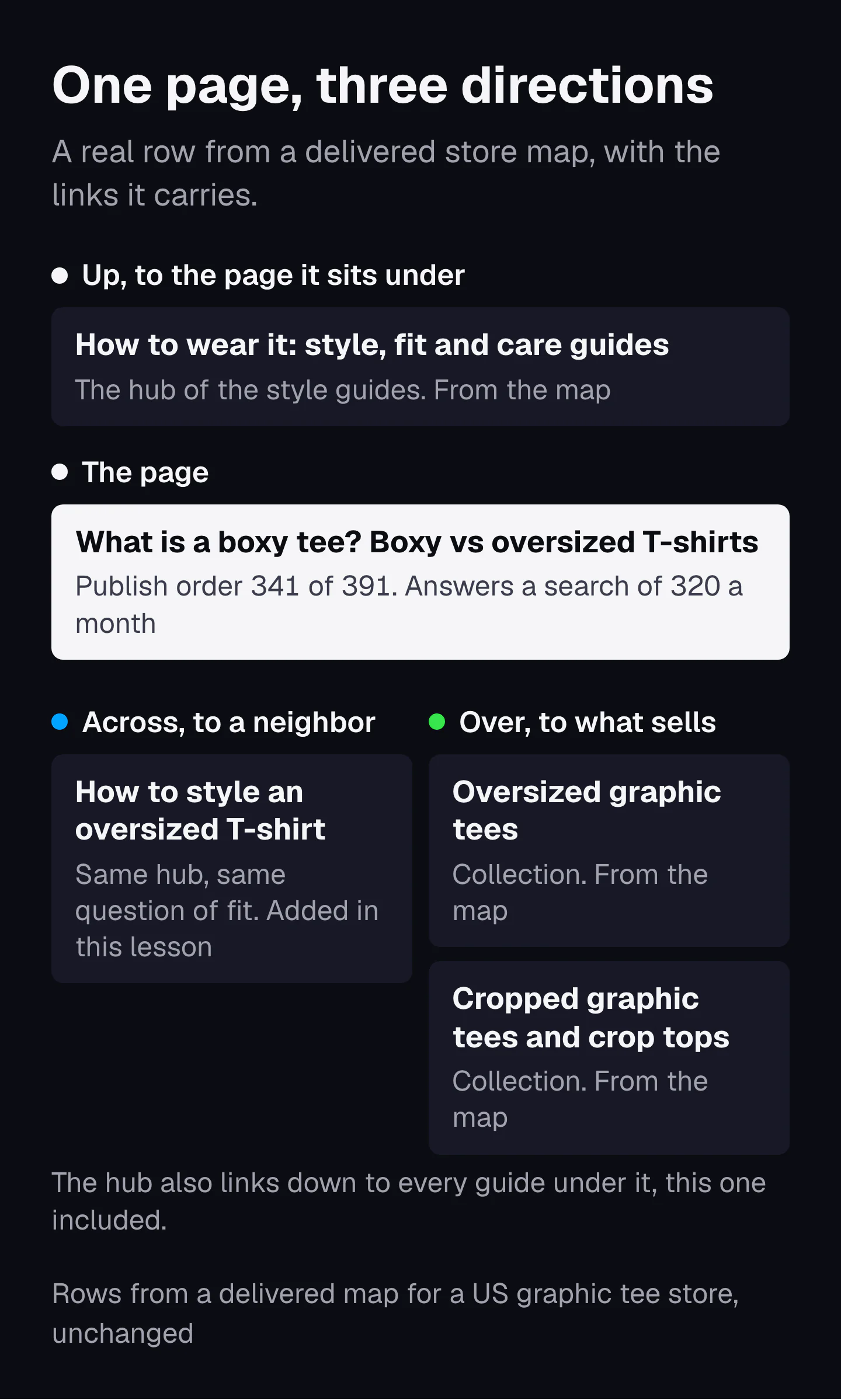
Here is one real row from a store map we delivered for a US graphic tee shop. The guide "What is a boxy tee? Boxy vs oversized T-shirts" goes live 341st of 391 pages and answers a search of 320 a month. It sits under the style guides hub, and the map gives it two links over to collections. I add one link across to a sibling guide about the same question of fit.
Why "over" is its own direction
Librarians named the first three directions decades before SEO. A thesaurus for information retrieval tags each relation BT, NT or RT: broader term, narrower term, related term (Stella G. Dextre Clarke, ISKO Encyclopedia of Knowledge Organization, 2019). Up is broader, down is narrower, across is related. Her test for a related link works word for word as a test for an across link: it belongs where "an indexer or a searcher should consider using one of them as well as, or instead of, the other".
A thesaurus has no "over", because a library sells nothing. Your site does. The over link comes from the site's purpose, which Koray calls the source context, and it is the link most maps built by hand leave out: the guide that answers a question never points to the page where the reader can buy the answer.
Hubs and pillars carry the down links. What a pillar should say about each child and why its links mostly help the pillar itself is in pillar pages.
Where on the page a link should sit
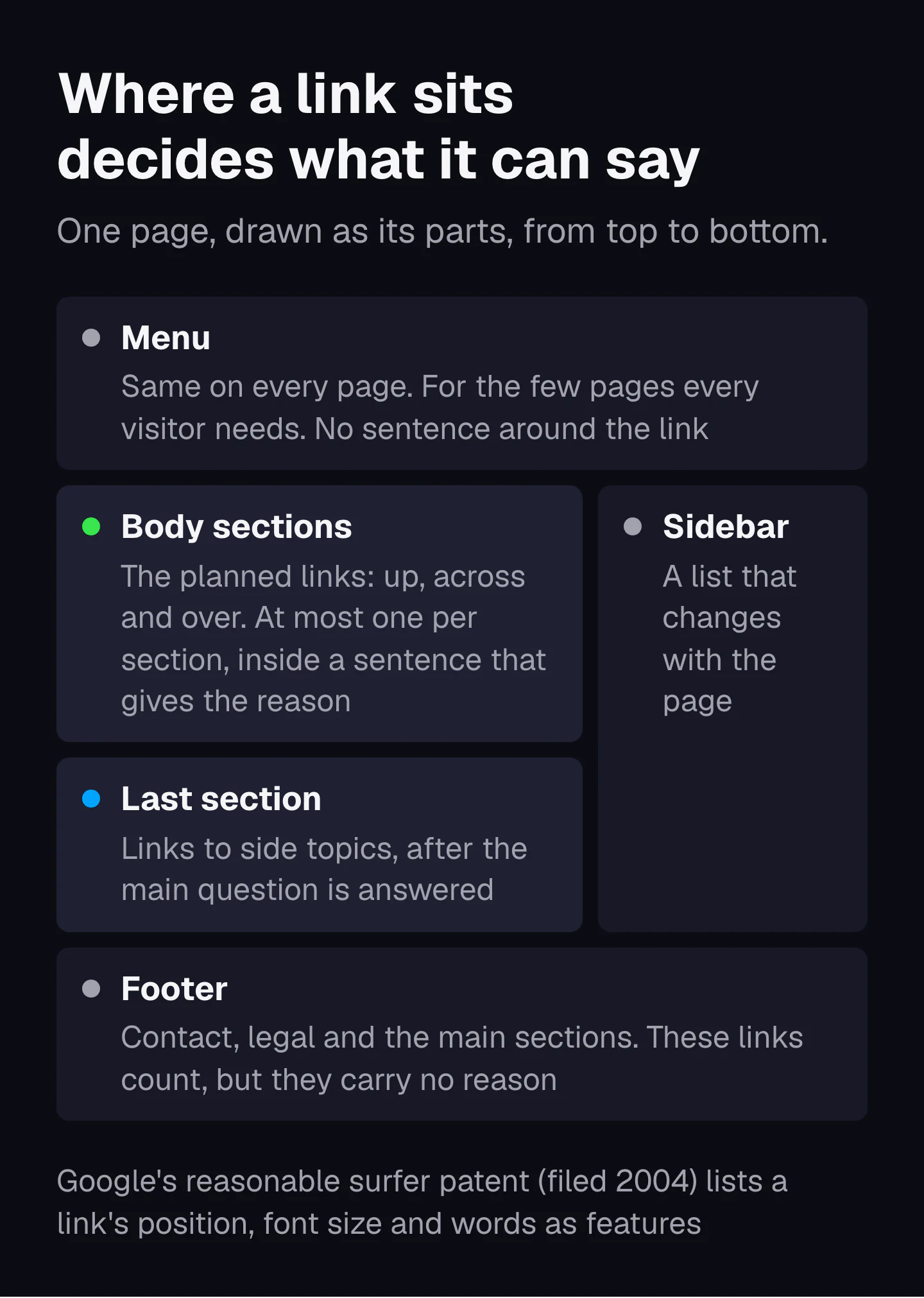
Plan your links in the main content, inside a sentence that says why the reader should go there. Menus and footers are for the few pages every visitor needs. Their links count, but they cannot carry a reason, and the reason is what a map adds.
Main content versus the menu and the footer
In 2004 Google filed a patent describing a "reasonable surfer model", in which "not all of the links associated with a document are equally likely to be followed" (US7716225B1, granted 11 May 2010, inventors Jeffrey A. Dean, Corin Anderson and Alexis Battle). Its examples of links people rarely follow are "Terms of Service" links and banner ads. Its list of link features includes the position of the link ("in a footer, in a sidebar", in running text, above or below the first screen), the font size and color of the anchor, and the anchor's words.
A patent shows what Google invented, not what runs today. But some of the same features are fields in Google's internal documentation that leaked in 2024. An anchor record there can hold the anchor's font size, a field described as "a hash of terms near the anchor", the full text to its left, and a field that records "the quality of the anchor's source page". Nobody outside Google knows how much each field weighs.
Footer links are not always worthless. SearchPilot, an SEO testing company, published a test in September 2021 in which one site's home page footer grew from 30 links to over 100, in a smaller font. The pages it linked to gained 5% organic traffic overall, short of their 95% confidence bar, and 10% on desktop, where it passed. One site and one footer prove little, but they show a footer link can carry some weight. What it cannot do is explain why this page matters next to that one.
Where inside the main content
Koray published his own placement rules in the February 2021 case study that introduced topical authority. On those sites each page had at most 15 links, most of them in the main content, and "I didn't use a footer or header menu." Among the items he lists for deciding a page's link count is "a maximum of 1 link in each heading section". When he linked to a side topic, he always used "one of the last heading's paragraphs". He says plainly that these are the rules he followed, not laws.
I use three of them as defaults on every page of a map:
- The up link sits early, where the page first names its parent subject.
- Across and over links sit in the section whose subject they continue, one per section.
- Links to side topics wait for the last section, so they never pull the reader away before the answer.
What the anchor says, and the sentence around it
The anchor is the target page's own name, the same words every time any page links to it. The sentence around it says why the reader should go there. Google's guidance asks for anchor text that is "descriptive, reasonably concise, and relevant to the page that it's on", and for links placed "in context" (Google Search Central, December 2025).
Why the sentence matters as much as the anchor
In 1999 Peter Pirolli and Stuart Card at Xerox PARC described how people move through information the way animals forage for food (Information foraging, Psychological Review). The Nielsen Norman Group turned that into a rule for links: people click the link with the highest information scent, "a mix of cues that they get from the link label, the context in which the link is shown, and their prior experiences" (Raluca Budiu, NN/g, 2020).
Put that next to the reasonable surfer patent and the two say the same thing. A link is worth what a reader on that paragraph would click. The label and the words around it make the scent, and the patent weights the link by the chance it gets followed. Google's leaked anchor record keeps the words around each link for a reason. So the reason your map records for a link is not paperwork. Written into the sentence, it is the scent.
Same name every time, or variety?
The evidence pulls in two directions, so here is all of it:
- Zyppy, an SEO consultancy, studied 23 million internal links on 1,800 sites in July 2022. Pages with at least one exact-match internal anchor had "at least five times more traffic", and pages with more anchor variations also had more clicks. Both are correlations. In a February 2026 update the author added that high anchor diversity "may suffer" on some sites.
- Google's leaked anchor statistics carry a field that flags a "spike of spammy anchor phrases" (IndexingDocjoinerAnchorStatistics, 2024).
- Koray's 2021 rules: never the same anchor "more than three times for a web page within the main content", never words from the first paragraph of the page being linked to, and always check that the anchor's words appear on the target page.
None of this is a controlled test, so the rule I use is my own judgment from it. Each page has one name, the main search it is built for, and the links to it use that name, bending the grammar where a sentence forces it. That keeps an exact-match anchor on the page, the pattern the Zyppy data favors. The variety comes from the sentences around the name, which differ on every page anyway, and on any one page I follow Koray's limit of three uses of the same anchor. No page sends a burst of identical anchors at one target. If two pages in your map share one name, you have a bigger problem than anchors: see keyword cannibalization.
| Weak link | Strong link | What changed |
|---|---|---|
| For more information, click here. | If the water has reached the basement, our flooded basement cleanup page covers what happens next. | The anchor is the page's name; the sentence gives the reason |
| Read our guide on water mitigation, water mitigation services and mitigation. | Mitigation stops the damage spreading; our water mitigation service is the first visit. | One link with one name, not three anchors for one page |
| Related posts: five links picked by date | Not sure your pipe burst? Here is how to tell if a pipe burst in your house. | Chosen by relation, not by a plugin |
How a written page carries these links through its headings and paragraphs is the subject of semantic content networks.
How many internal links a page needs
There is no fixed number. Give each page one link for every relation a reader needs: one up, one over where a page sells the thing, and one to three across. Koray's 2021 test sites ran at most 15 links a page, and in 2022 he set a ceiling of under 150 (Oncrawl, January 2022), with the same links on the mobile and desktop versions.
The 45 to 50 link figure is about links in, not links on a page
The number you will see quoted most comes from the Zyppy study above. URLs with 0 to 4 internal links averaged 2 clicks from Google; URLs with 40 to 44 got four times that; and after a URL receives about 45 to 50 internal links, traffic started to fall. Read it carefully: those are links pointing into one page, counted against that page's clicks. It says nothing about how many links a page should carry. One of the top-ranking guides for this query presents it as a limit per page. It is a correlation about pages that are linked to a lot.
The controlled results on link counts point both ways. The footer test above added links and helped the pages they pointed to. In another SearchPilot test, summarised in May 2024, cutting the number of links in a block of links helped the pages that stayed in it rank better. In the 1998 PageRank formula, a page's weight is divided among all of its links, so every extra link dilutes the others.
| Page in the map | Links it needs in the main content |
|---|---|
| Pillar | Down to every page under it, plus over to the main pages that sell |
| Hub | One up, down to every child, across to one sibling hub if a reason exists |
| Page that sells (service, collection, product) | One up, across to one or two neighbors, down to the guides that answer its questions |
| Guide or question page | One up, one over to the page that sells, one to three across |
Which pages to link from first
A link from a page people actually reach likely does more than a link from a page nobody visits. Google patented a ranking that starts from trusted "seed" pages and scores every page by its link distance from them (US9165040B1, granted 20 October 2015). The 2024 leak has a field called onsiteProminence that "measures the importance of the document within its site" and is "computed by propagating simulated traffic from the homepage and high craps click pages" (PerDocData). So when a new page goes live, its first links in should come from pages close to the homepage or pages that already get visits, not from another new page.
What to do with links to pages that are not built yet
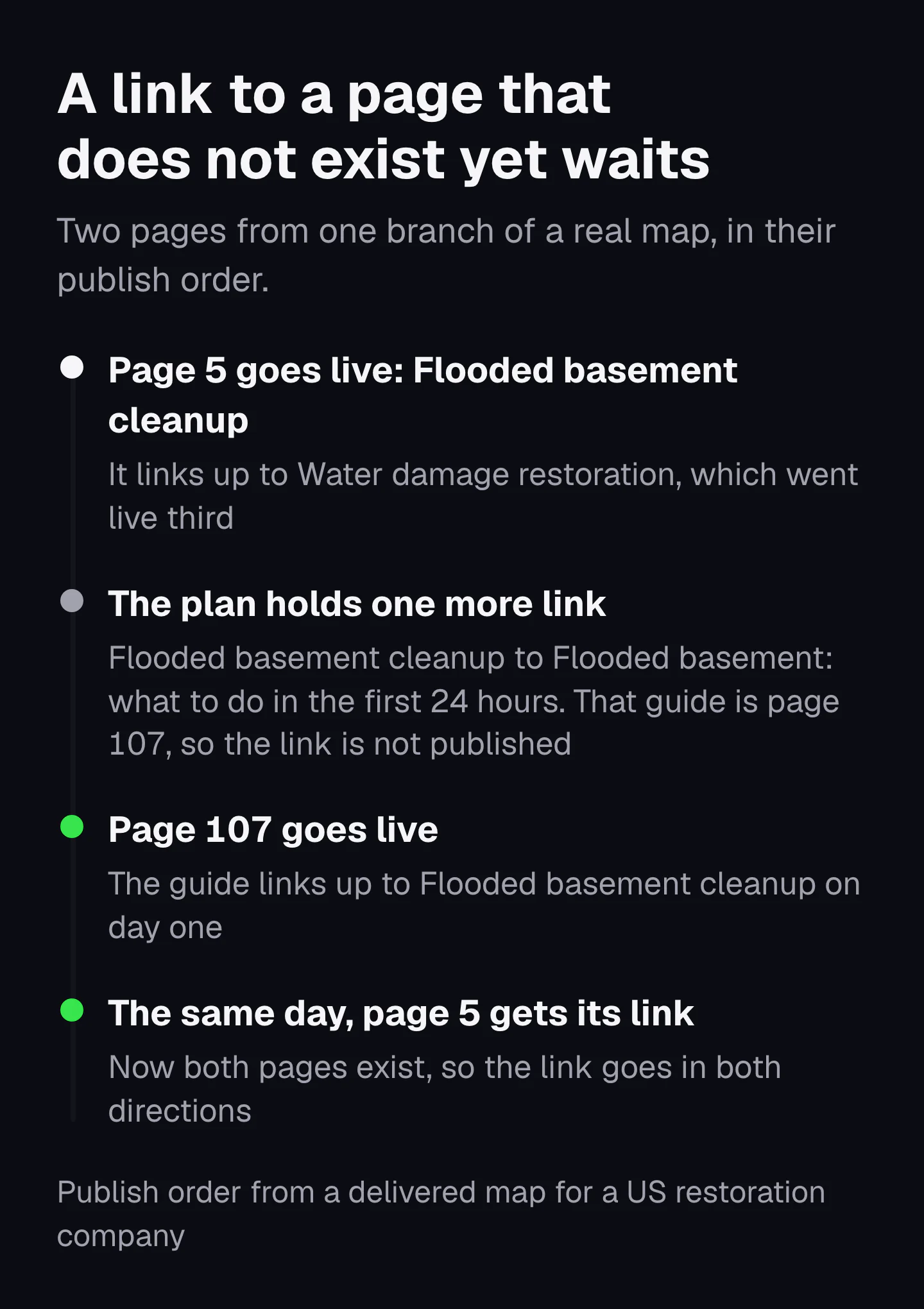
Do not publish a link to a page that does not exist yet. Keep it in the plan, and add it on the day the second page goes live, in both directions. Until then, the new page links to the live page above it.
A buyer asked us this on a call: his map told him to link to pages he had not built. That is normal. A map plans the whole subject, so on the day you publish page 5, half its planned links point at pages that will exist next month. A link to an address that does not answer sends the reader to an error page and asks Google to fetch a page that is not there.
The fix is a routine, not a rewrite:
- Publish the page with every planned link whose target is live, and its up link.
- Keep the rest in a list: source page, target page, the sentence it goes in, the anchor.
- Each time a page goes live, open that list and add every link that points at it, from the pages already live.
- Give the new page its own links out to everything already live, the same day.
A good publishing order makes this list short, because it sends the pages most others link to out first. That is the whole of publishing order. Our growth plan keeps the waiting links for you and shows which ones can go in as each page goes live.
A link plan for one real branch: water damage restoration
Here is one branch of a real 173-page map we delivered to a water and fire damage restoration company in the US. The business name and the state are replaced with [brand] and [state], and in the table the titles are shortened to fit (the CSV below keeps them whole). The up links come from the map file. The across and over links are the ones I add with the rules above, each with its reason and the day it goes in.
| Order | Page | Links up to (map) | Adds | Why | Goes in |
|---|---|---|---|---|---|
| 3 | Water Damage Restoration in [state] | Water, Fire & Storm Damage Services | Down to every page under it | It is the hub of the branch | Each link the day its child goes live |
| 4 | Water Damage Cleanup in [state] | Water Damage Restoration | Across to Water Damage Repair | Cleanup comes before repair | When page 15 goes live |
| 5 | Flooded Basement Cleanup in [state] | Water Damage Restoration | Across to Burst Pipe Cleanup; down to the 24 hours guide | A burst pipe is one way a basement floods; the guide is the first step before the call | At page 6; at page 107 |
| 6 | Burst Pipe Water Damage Cleanup in [state] | Water Damage Restoration | Across to Flooded Basement Cleanup | Same reason, the other way | The day it goes live |
| 8 | Does Homeowners Insurance Cover Water Damage? | Insurance Claim Help (another branch) | Over to Water Damage Restoration | After the cover question comes the call | The day it goes live |
| 10 | Water Damage Restoration Cost: What Drives the Price | Water Damage Restoration | Across to the insurance question (page 8) | Cost and cover are the two money questions | The day it goes live |
| 15 | Water Damage Repair in [state] | Water Damage Restoration | Across to Water Damage Cleanup | Cleanup comes before repair | The day it goes live |
| 19 | Water Mitigation Services in [state] | Water Damage Restoration | Nothing beyond its children | Its guides link to it | |
| 32 | How to Tell if a Pipe Burst in Your House | Burst Pipe Water Damage Cleanup | Nothing more | Its parent is the page that sells | |
| 77 | What Is Water Mitigation? Meaning and Examples | Water Mitigation Services | Across to Mitigation vs Restoration | The same term, then the next question | When page 78 goes live |
| 78 | Water Mitigation vs Restoration: The Difference | Water Damage Restoration | Across to What Is Water Mitigation; over to Water Mitigation Services | It names both services and only sits under one | The day it goes live |
| 107 | Flooded Basement: What to Do in the First 24 Hours | Flooded Basement Cleanup | Across to the dehumidifier guide | Both are about drying the room | When page 127 goes live |
| 127 | Dehumidifier for Water Damage: How Long to Run It | Water Mitigation Services | Across to the 24 hours guide | Same reason, the other way | The day it goes live |
| 142 | Restoration Company vs General Contractor | Reconstruction (another branch) | Over to Water Damage Repair | The comparison is about who does the repair | The day it goes live |
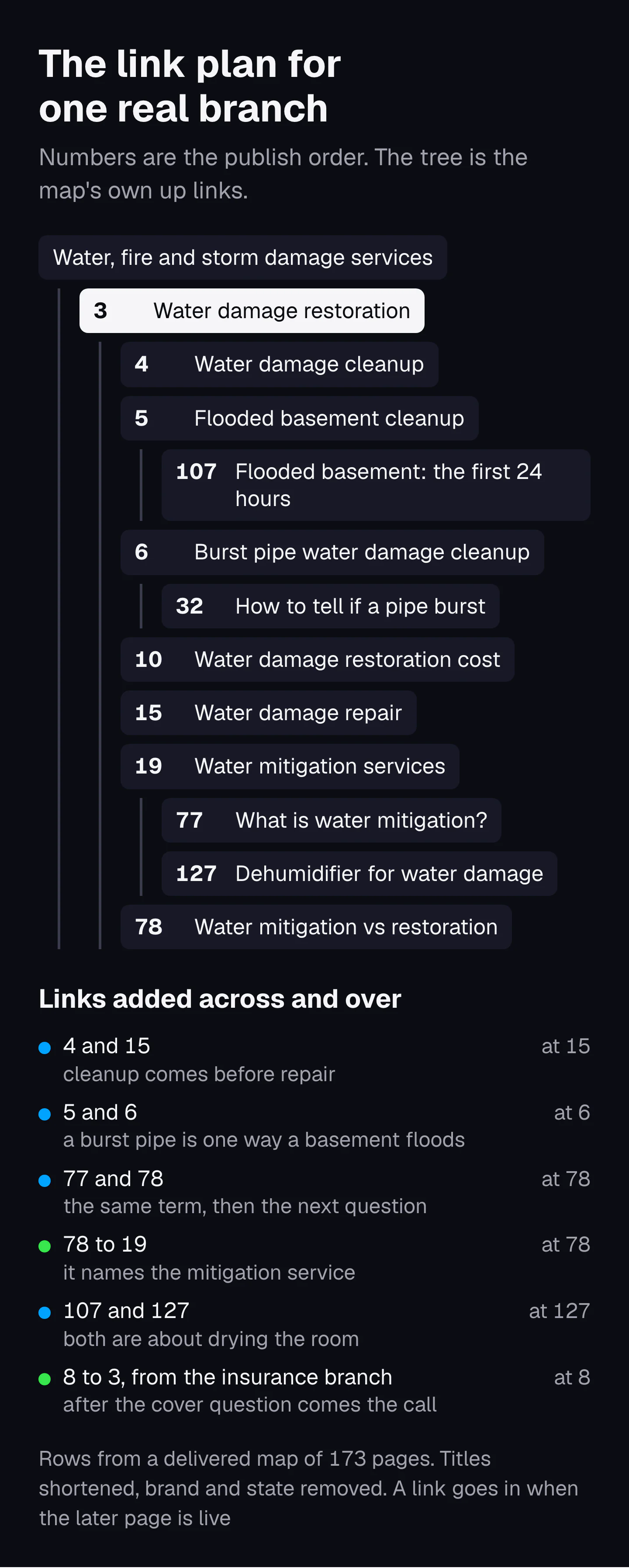
Three things to notice:
- The services go first and link to each other. The service pages (3, 4, 5, 6, 15, 19) are the ones that take calls. Cleanup and repair link across, and so do burst pipe and flooded basement cleanup, because a homeowner on one page often needs the other.
- Two pages live in other branches and still link in. The insurance question (page 8) sits under the insurance claim help page, and the contractor comparison (page 142) under reconstruction. Each gets one over link into this branch, because each ends at the moment the reader needs the service.
- Page 19 adds nothing. Not every page needs an across link. Its guides link up to it, and that is enough.
Download the link plan (CSV)This branch as a link plan, with empty audit columns. Delete the rows and use it for your own branch.
Three full maps, opened up row by row, are in topical map examples.
What an SEO silo gets right, and where it breaks
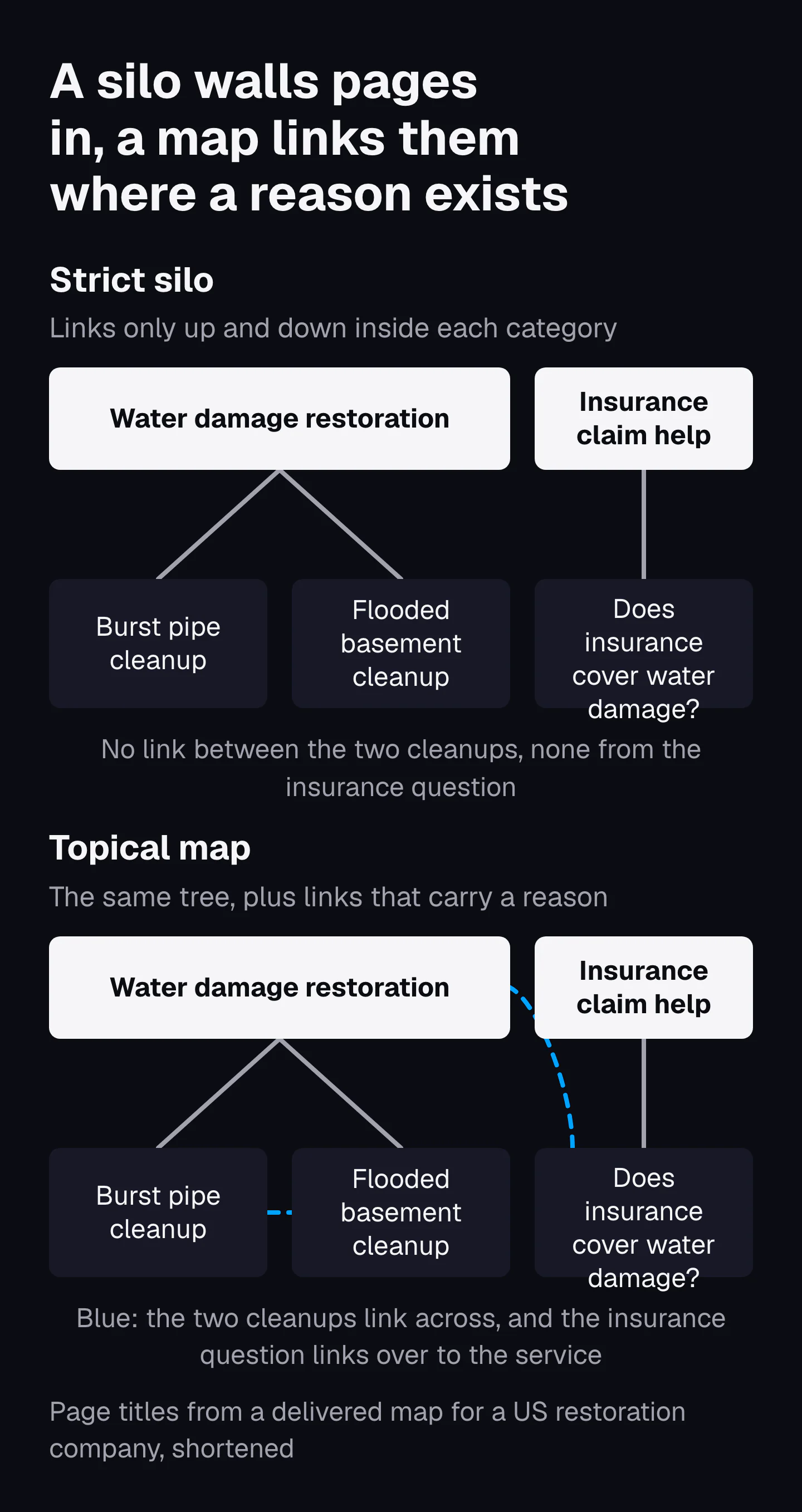
A strict SEO silo, also called a content silo, keeps each topic's pages linking only inside their own category, up and down, with any route between categories going through the top. It gets the grouping right, and its walls block links readers need.
What it gets right
A silo forces you to give every page one parent and keep each category on one subject. That focus has support outside SEO folklore. Bing's webmaster guidelines (2026) tell you to "Focus Each URL on a Single Topic", and Google's leaked documentation has a site-level field, siteFocusScore, described as the "number denoting how much a site is focused on one topic" (QualityAuthorityTopicEmbeddingsVersionedItem, 2024). A map keeps all of that: the up and down links are a silo's tree.
Where it breaks
- It forbids links readers need. The best evidence that sideways links help comes from a SearchPilot split test published in January 2021, on a site with about 8,000 regional pages. Each test page got links to its six nearest regional pages, and the pages receiving those links gained 7% in organic traffic against a control group. The test was not about silos, but it measured sibling links, and a strict silo only allows them inside one category.
- It cuts the guides off from the page that sells. When the buying guides sit in a blog category and the products in a shop category, a silo has no over link. The reader who is ready leaves.
- It leaves the crossing to the menu. The only route between categories becomes a menu or footer link, the kind that carries no reason.
Koray's framework expects maps to cross branches. Writing about Encazip, a site built on an energy topical map, he says that when the company decides to expand into credit and insurance, "a contextual bridge is needed" between the energy map and those topics (topical map case study, January 2023). The test he gives for a link across branches is the same one this lesson uses: a shared idea you can name.
How to audit an existing site's internal links by hand
Pick one branch, list its pages, and for each page count the links in the main content that go up, across and over. Read their anchors, then find the pages nothing links to. Google Search Console and a browser are enough.
- List the branch. Take one hub and every page under it, from your map or your sitemap. One branch at a time keeps the job finite.
- Count the links in. In Search Console, open the Links report and then the table of top internally linked pages. Select a page to see which of your pages link to it (Search Console Help). The tables stop at 1,000 rows, so on a large site work from the page view, not the totals. The report does not say where on the linking page a link sits, so open the pages it lists: a page with no link in from the main content of another page is your first fix.
- Open each page and read only the main content. Skip the menu, sidebar and footer. Note every link: is it up, across or over? Is the up link there at all?
- Check every across link for a reason. If you cannot write why a reader on that paragraph would follow it, delete it or move it to the last section.
- Check the over links. Every guide that names something you sell should link to the page that sells it. This is where most sites lose the most.
- Read the anchors. Each should be the target page's name. Flag "click here", a bare address, and two different pages linked with the same words.
- Click every link once. A link that lands on an error page or passes through a redirect gets changed to the final address.
- Write the fixes into the plan, with the sentence each new link goes in, then make the changes branch by branch.
The CSV above has the audit columns already: links up, across and over found in the main content, whether the anchors match, dead or redirected links, and the count from Search Console.
The internal linking mistakes we check for in a map
The first mistake on this list is the one I find in maps people build themselves: the pages "do not build on each other". They sit side by side with no links, so the map is a list. The others are what we check for in every map, and each follows from a rule above.
| Mistake | What it costs | Fix |
|---|---|---|
| Pages with no links between them | Nothing tells the reader or Google the pages belong to one subject | Give every page its up link before anything else |
| Links only in the menu and footer | The links carry no reason and repeat on every page | Plan the links in the body, one per section |
| Guides that never link to the page that sells | Readers who are ready to buy have nowhere to go | One over link from every guide that names a product or service |
| Links to pages that are not live | Error pages for readers, wasted fetches for Google | Keep a waiting list and add each link the day its page goes live |
| "Related posts" widgets standing in for planned links | Links chosen by date or tag, not by relation | Keep the widget if you like, but plan the body links yourself |
| Linking every mention of a term | Many links share one page's weight, and the one link that matters gets lost | One link per relation, once per page |
| A new page linked only from other new pages | The page sits far from anything that gets visits | Add its first link in from a page close to the homepage or one that already gets traffic |
| Several anchors for one page, or one anchor for two pages | Readers and Google cannot tell which page answers which search | One name per page, used for its links |
None of this needs a tool. It needs the map to say, for every page, where it links and why, before a word is written. If you would rather have that plan made, the growth plan includes the internal linking plan for every page, with the links that wait for pages not yet live.
Sources
- The Anatomy of a Large-Scale Hypertextual Web Search Engine, Sergey Brin and Lawrence Page, Stanford, 1998
- Ranking documents based on user behavior and/or feature data (US7716225B1, the reasonable surfer patent), Google LLC, patent, 2010
- Producing a ranking for pages using distances in a web-link graph (US9165040B1), Google LLC, patent, 2015
- Life of a Click (user-interaction), trial exhibit UPX0004, Google, US Department of Justice exhibit, 2017
- United States v. Google LLC, memorandum opinion on remedies, US District Court for the District of Columbia, 2025
- AnchorsAnchor (leaked Content Warehouse API documentation), hexdocs.pm copy of the 2024 leak, 2024
- IndexingDocjoinerAnchorStatistics (leaked Content Warehouse API documentation), hexdocs.pm copy of the 2024 leak, 2024
- PerDocData (leaked Content Warehouse API documentation), hexdocs.pm copy of the 2024 leak, 2024
- Importance of Topical Authority: A Semantic SEO Case Study, Koray Tuğberk Gübür, Oncrawl, 2021
- Creating Semantic Content Networks with Query and Document Templates, Koray Tuğberk Gübür, Oncrawl, 2022
- How to Expand a Topical Map for Higher Topical Authority?, Koray Tuğberk Gübür, Holistic SEO, 2023
- Information foraging, Peter Pirolli and Stuart Card, Psychological Review, 1999
- Information Scent: How Users Decide Where to Go Next, Raluca Budiu, Nielsen Norman Group, 2020
- Thesaurus (for information retrieval), Stella G. Dextre Clarke, ISKO Encyclopedia of Knowledge Organization, 2019
- QualityAuthorityTopicEmbeddingsVersionedItem (leaked Content Warehouse API documentation), hexdocs.pm copy of the 2024 leak, 2024
- Bing Webmaster Guidelines, Microsoft Bing, 2026
- Link best practices for Google, Google Search Central, 2025
- Links report, Google Search Console Help, 2026