Keyword cannibalization: how to find, fix and prevent it
Keyword cannibalization is when two or more pages on one site compete for the same search and the same need, so neither ranks as well as one clear page would.
Two of your pages ranking for one search is not always a problem. Here is how to tell when it is, how to find it with free tools, which fix to use, and how a topical map stops it before a page is written.

Key takeaways
- Two of your pages ranking for one search is only cannibalization when they answer the same need and do worse together, for example when neither reaches the top 3.
- Google says its site diversity system generally shows no more than two listings from one site in the top results, so two pages for one need compete for the same one or two places.
- In the Search Console Pages tab each page counts its own impressions, so a search filter followed by the Pages tab shows every page Google really showed for that search.
- No one has published a controlled test of a cannibalization fix, so measure your own: 28 days before, the same 28 days after, and a few pairs you left alone.
- A topical map prevents cannibalization by naming one owner page for every search and listing the variants that page also covers, the way a library thesaurus picks one preferred term.
What keyword cannibalization is, and when two rankings are fine
Keyword cannibalization is when two or more of your pages compete for the same search and the same need. Neither ranks as well as one clear page would. Two pages ranking for one search is not a problem by itself. The need behind the search decides.
The precise version of the idea comes from Koray Tuğberk Gübür. In 2021 he called it ranking signal dilution: "the error that two web pages compete with each other for the same canonical query". His canonical query is the one wording that best sums up all the variants of a need. So the test is about the need, not the exact words. In 2026 he named the small version, where one paragraph on a page overlaps another page, micro-cannibalization.
Google sees it the same way. In September 2025, John Mueller of Google answered a question about pages that rank for the same searches. Search Engine Journal reported his words: "pages aren't duplicates just because they happen to appear in the same search results page". And: "Reduce unnecessary duplication and spend your energy on a fantastic page, sure."
The three-condition test
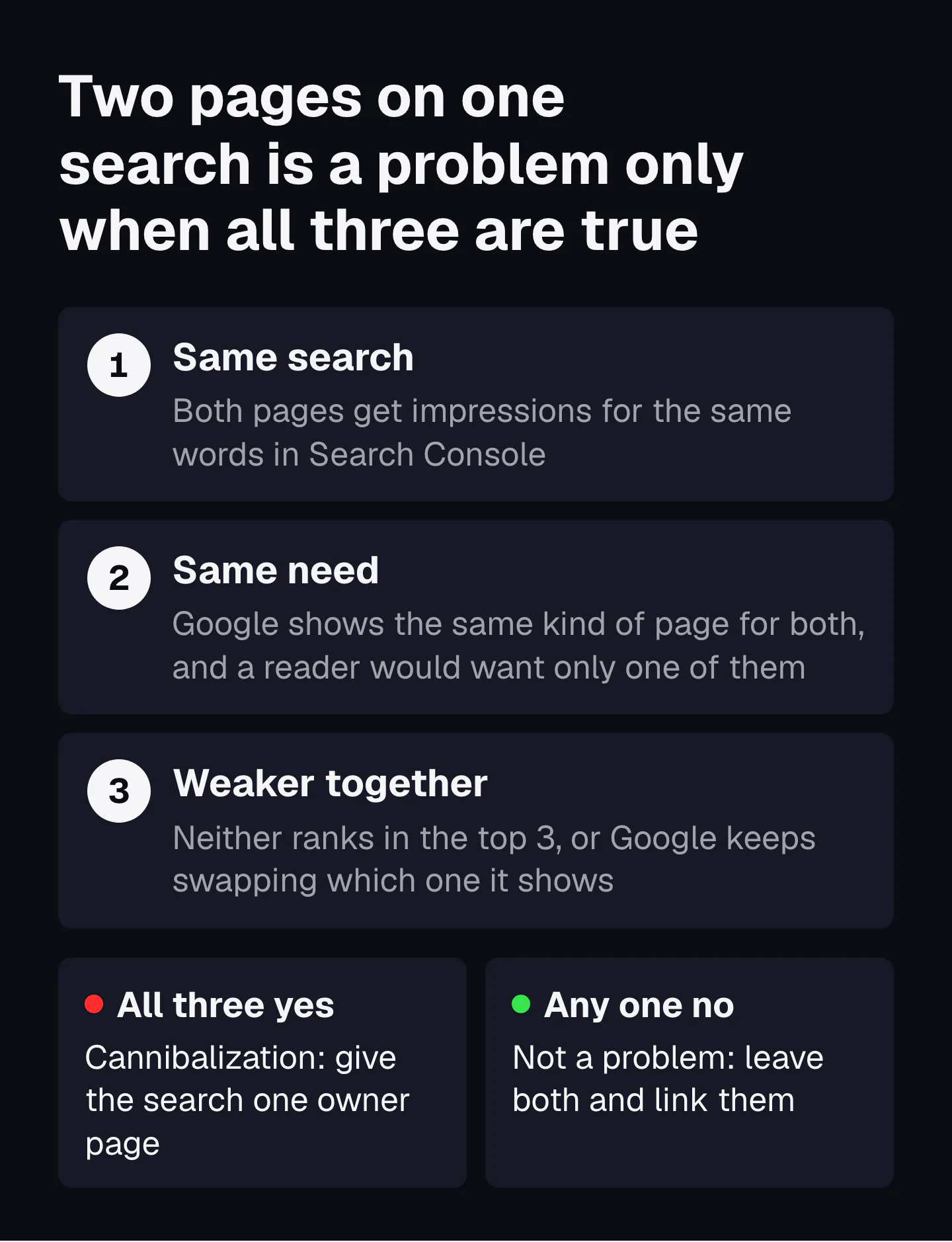
Put those two views together and you get a test. A pair is cannibalization only when all three conditions are true: the same search, the same need, and both pages weaker for it.
| Looks like cannibalization | Is it? | Why |
|---|---|---|
| A product page and a how-to guide both rank for one search | No | Two needs: buying and learning. Google often shows both kinds. |
| Two of your pages hold positions 1 and 3 | No | Not weaker together. You own more of the page. |
| A page ranks for hundreds of long searches that share a word with another page | No | Overlap on long tails is normal. Check the main search of each page. |
| Two blog posts answer the same question, at positions 11 and 14 | Yes | Same search, same need, and neither reaches the first page. |
| Google swaps which of two pages it shows from week to week | Usually yes | It cannot pick an owner, so neither builds a steady record. |
Cannibalization is also not the same as duplicate content. Two pages can share a need with completely different text, and two near-copies can serve different needs. Whether a search deserves its own page in the first place is a decision with its own lesson: when a search deserves its own page.
Why your second page competes with your first
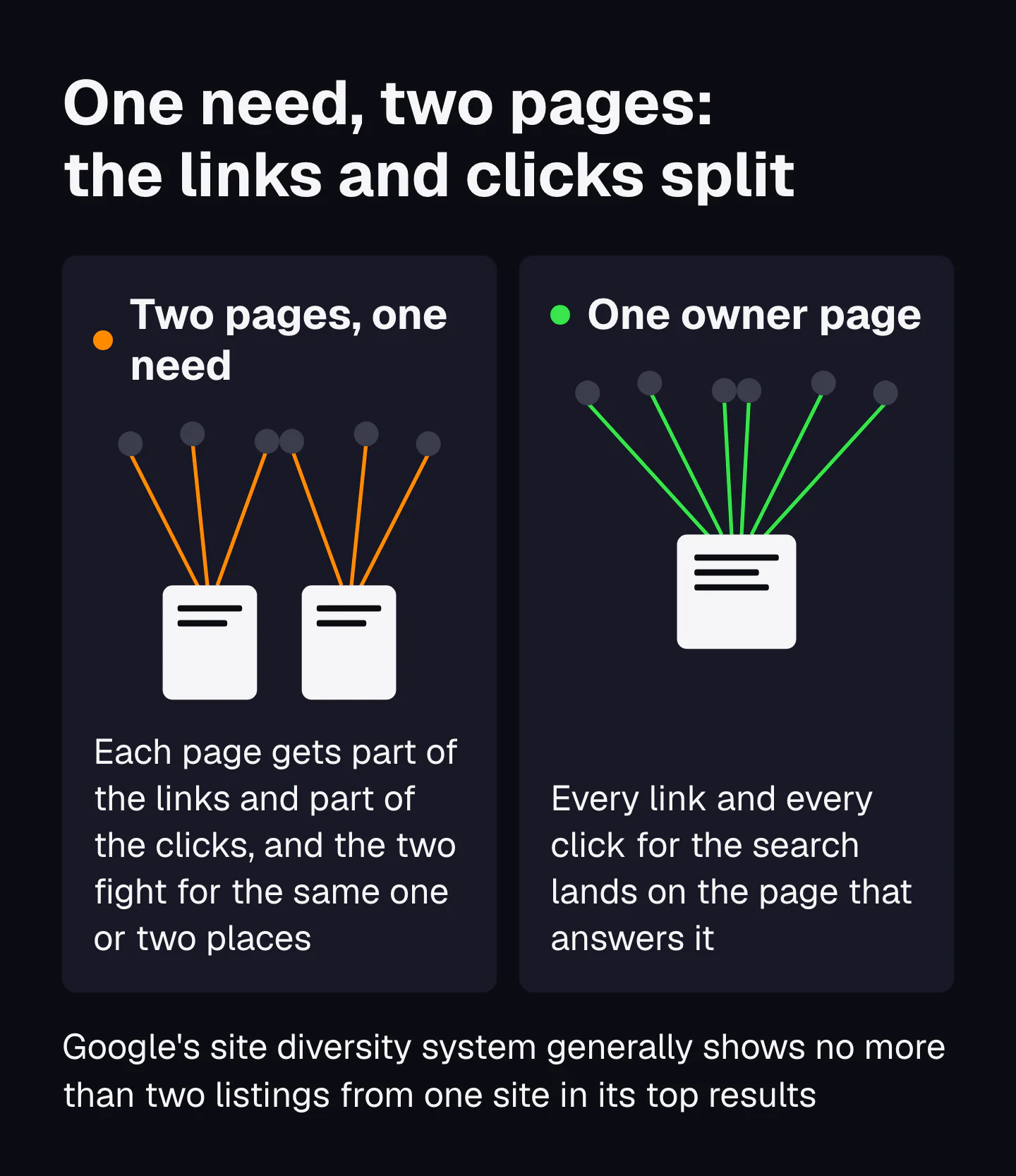
Search engines show few results per site for one search and drop near-duplicates. So two of your pages for one need fight for the same one or two places. They also split the links and clicks one page would have had.
What Google has said about results from one site
Google names two systems in its guide to its ranking systems. The site diversity system "generally won't show more than two web page listings" from the same site in the top results. Its deduplication systems show only the most relevant of results that are very similar.
The idea is old. A Google patent application filed in 2010 describes the trade-off between "result quality", more results from one relevant site, and "result diversity", results from many sites. It notes that engines limit the results shown from one host. A patent shows what Google designed, not what runs today.
Research had the same idea first. In 1998, Jaime Carbonell and Jade Goldstein at Carnegie Mellon described maximal marginal relevance, which scores each next result by how much it adds over the results already picked. Charles Clarke and colleagues at Waterloo built the same rule into a measure in 2008. A result list scores lower when it repeats what is already there (novelty and diversity in retrieval evaluation). Your second page on the same need is, to such a system, a repeat.
Engines also spot near-copies cheaply. Google's near-duplicate detection patent, filed in 2001, gives each document fingerprints and treats two pages as near duplicates when a fingerprint matches.
What Bing says, for search and for AI answers
Bing's Webmaster Guidelines are blunter, and they now cover Copilot answers too. Section 6 says: "Duplicate URLs dilute signals and reduce Bing's confidence in selecting a URL for grounding results or citations." Section 17 adds that "URLs focused on a primary topic are more likely to be selected for grounding results". Grounding is the step where an AI answer picks the pages it quotes.
Fewer, clearer pages are also cheaper for an engine to crawl, store and choose between. Koray wrote in 2024: "Decrease the total page number to prevent ranking signal dilution". The full idea is in cost of retrieval.
How to find keyword cannibalization in Search Console, step by step
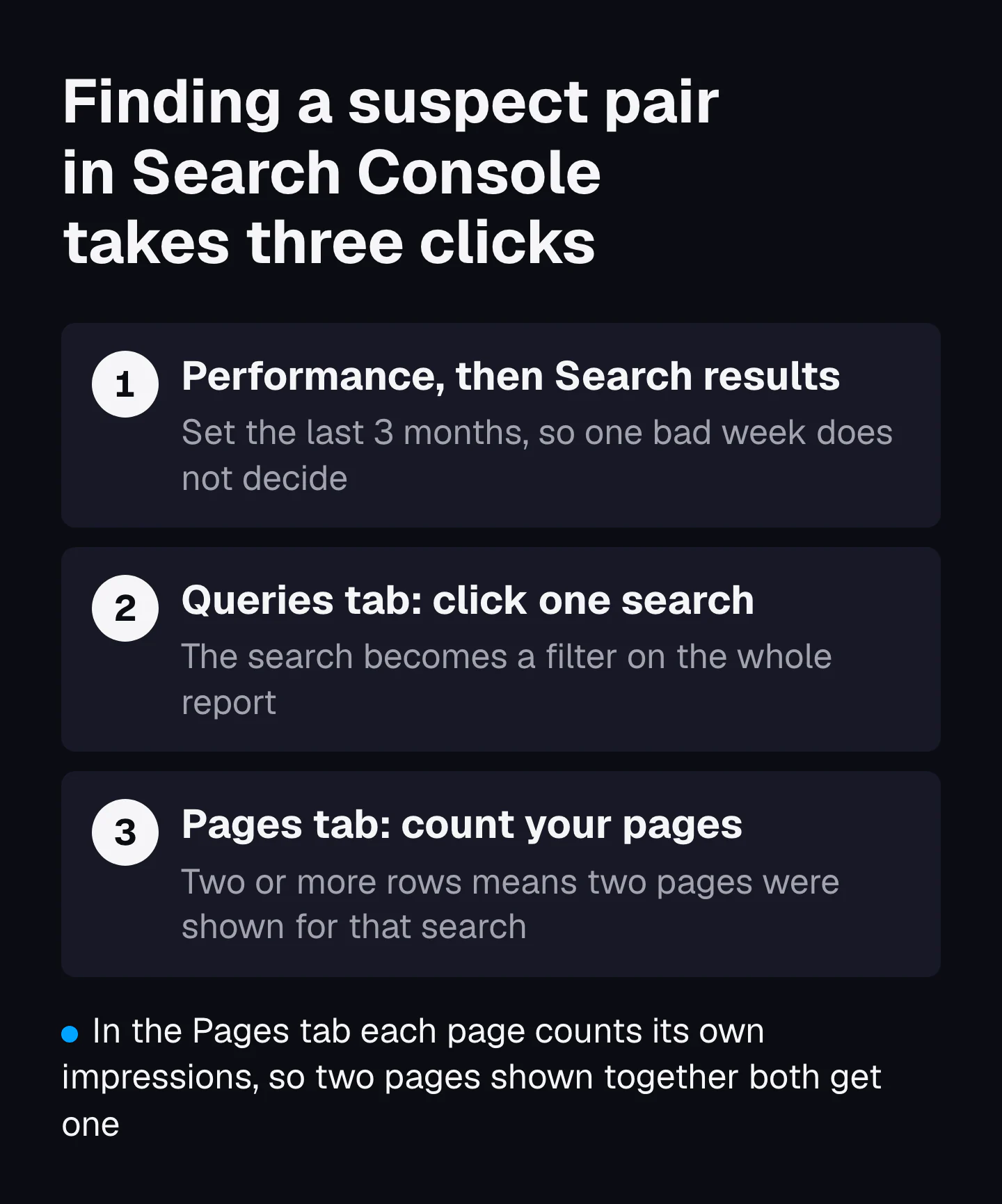
Open the Performance report, pick a search in the Queries tab, then open the Pages tab. Two or more of your pages with impressions for that one search is a suspect pair. It takes three clicks and costs nothing.
- Open Performance, then Search results. Set the date range to the last 3 months, so one odd week does not decide.
- Open the Queries tab and sort by impressions. Start with the 50 searches that matter most to you, not the long tail.
- Click one search. It becomes a filter on the whole report.
- Open the Pages tab. Each row is a page Google showed for that search. One row is fine. Two or more rows is a suspect pair.
- Write down each page's impressions, clicks and position in the worksheet at the end of this lesson.
- Compare two date ranges. Use the date filter's Compare option, for example the last 28 days against the 28 before. If the page with the most impressions changes between the two, Google is swapping owners.
- Repeat for the next search, then run every suspect pair through the three-condition test.
Why the Pages tab tells the truth
Search Console counts impressions two ways, and this is the detail most guides skip. The Performance report help says the chart is aggregated by property: "if two results from the same site appear for one query, they count as a single impression". The table grouped by Pages is aggregated by page. So when you filter by a search and open the Pages tab, each of your pages that showed gets its own count.
It also only shows real events. Mueller, in the same 2025 answer: "Search Console shows data for when pages were actually shown, it's not a theoretical measurement." A page that never appeared for the search will not be in the list.
Three limits to know before you trust the numbers
- Rare searches disappear under a filter. Google's Daniel Waisberg explained in a 2022 post on Search Console limits that anonymized queries "aren't issued by more than a few dozen users over a two-to-three month period". They never show as rows, so very small overlaps stay hidden.
- The screen stops at 1,000 rows. Per the same post, "The maximum you can export through the Search Console user interface is 1,000 rows of data."
- For a whole site, pull search and page together. The Search Console API returns up to 25,000 rows a request, with a ceiling of 50,000 rows per day per site per search type. Pull the search and page dimensions together, then count how many pages each search has in a spreadsheet. The same export also shows the searches no page answers well, which is where a content gap check starts.
How to check a suspect pair with a site search and the top 10
Search site:yourdomain.com plus the words to see which of your pages Google holds for them. Then search both wordings and compare the two top 10s. Shared results and the same kind of page mean one need.
The site search
Type site:yourdomain.com burr grinder into Google. Every result is one of your pages that Google has indexed and connects to those words. It is a fast way to find old posts you forgot about. It is not complete: Google's own page on the operator says it "doesn't necessarily return all the URLs that are indexed". Use it to add suspects, never to clear one.
The top 10 overlap check
Search both wordings in a private window and lay the two result lists side by side. Count the results that appear in both, and note what kind of page wins each. This is how engines group searches too. Doug Beeferman of Lycos and Adam Berger of Carnegie Mellon clustered queries by the pages people clicked in 2000, and researchers at Microsoft Research Asia did the same in 2002. A 2013 Google patent groups query refinements by the documents people click for them.
I ran this check for this lesson on 13 November 2026, on searches from two real maps we delivered: a US store selling graphic tees and a US water damage company. Top 10 organic results, US, desktop.
| Search A | Search B | Shared results | What it says |
|---|---|---|---|
| oversized graphic tee | how to style an oversized t shirt | 0 of 9 and 6 | Shop grids for the first, style guides for the second. Two needs, two pages. |
| heavyweight t shirt | what is a heavyweight t shirt | 0 of 9 and 7 | Collections and product pages for the first, explainers for the second. Two pages. |
| water damage restoration | water damage repair | 1 of 9 and 9 | Local results, so the addresses differ. But 6 of the 9 results for repair are titled restoration. |
| water damage restoration | water damage cleanup | 1 of 9 and 9 | Local again. 7 of the 9 results for cleanup are titled restoration. |
| water damage restoration | water mitigation | 1 of 9 and 8 | Only 2 of the 8 results for mitigation are titled restoration. Its own service. |
| water mitigation | water mitigation vs restoration | 0 of 8 and 9 | All 9 results for the second are comparison articles. A comparison page of its own. |
The store pairs are clean. Not one shared result, and different kinds of pages win. Those are two needs, so a collection and a guide can both live without competing.
The water searches show where the check breaks. On a local search the URL count lies, because Google shows a different company for each city, so almost nothing is shared. Read the titles instead. Most results for repair and cleanup are restoration pages, so Google treats them as one service. Unless a business really sells repair or cleanup as a separate job, I would give those words to the restoration page as sections. Mitigation has its own results, and the comparison search wants a comparison page.
Which fix to use: merge, redirect, re-aim or leave
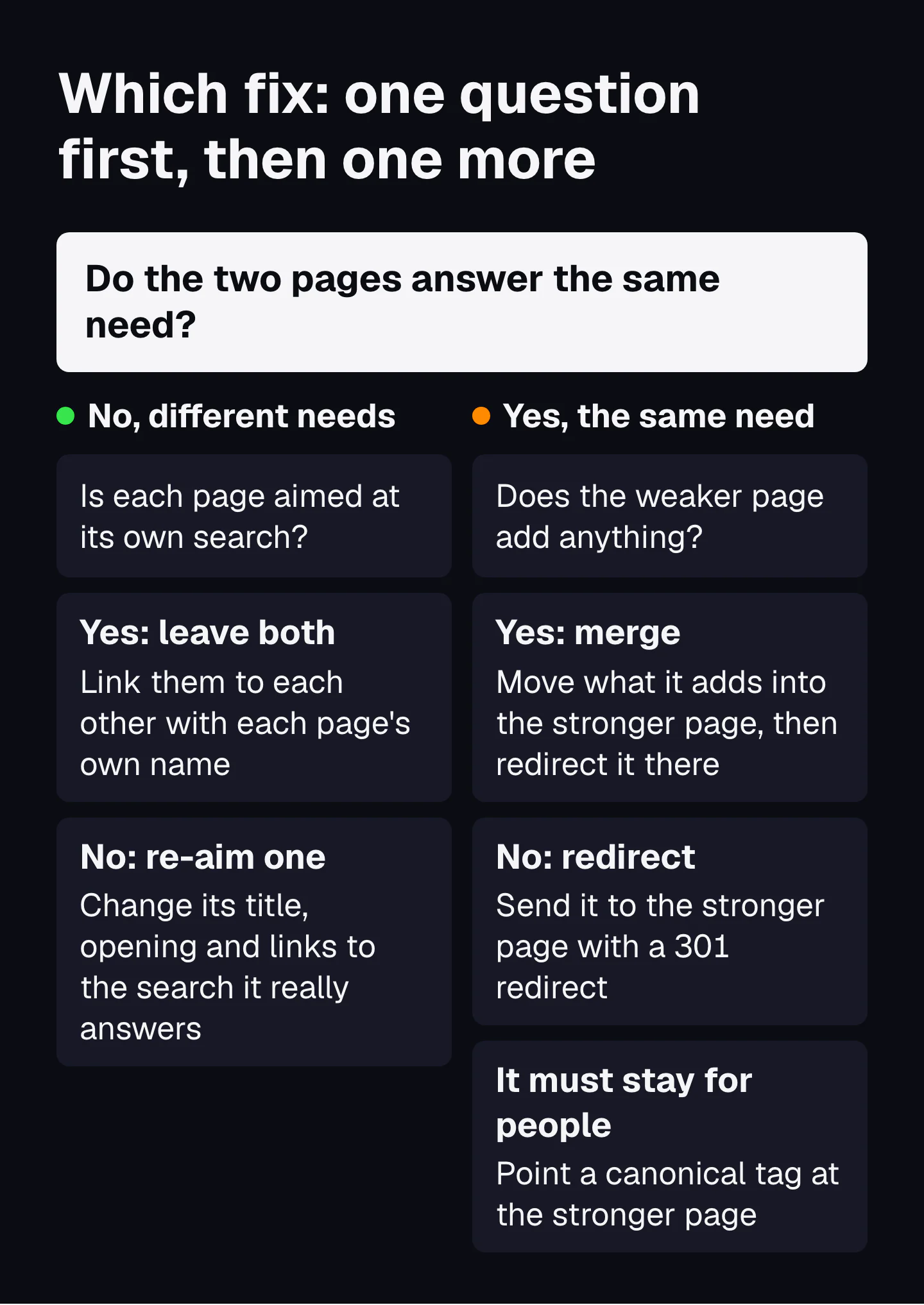
Same need and both pages have value: merge into the stronger one and redirect the other. Same need and one adds nothing: redirect it. Different needs: re-aim one page, or leave both. Canonical tags and noindex are for pages that must stay for people.
| When | Fix | What stays | How |
|---|---|---|---|
| Different needs, each page aimed at its own search | Leave both | Both pages | Link each page to the other, using the other page's own name as the link words. |
| Different needs, but one page is aimed at the other's search | Re-aim one | Both pages | Rewrite the weaker page's title, H1 and opening for the search it really answers, and point its links at the owner. |
| Same need, and the weaker page has something the owner lacks | Merge | The stronger URL | Move the missing parts into the owner, then 301 the weaker page to it and update your internal links. |
| Same need, and the weaker page adds nothing | Redirect | The stronger URL | 301 the weaker page to the owner. My rule: a page with no purpose does not deserve to stay. |
| Same need, but the page must stay for people (an ad landing page, a print version, a filter) | Canonical | Both live, one in search | Add a rel=canonical tag on the copy that points at the owner. |
| The page must stay and must never appear in search | Noindex | Both live, one in search | A robots meta tag on the page itself. Never a noindex line in robots.txt: Google stopped reading those in 2019. |
Which page becomes the owner
Keep the URL with the most links in from other sites, then the one that ranks better, then the one with more clicks over 3 months. Then check its type: if Google shows collections for the search, the owner should be your collection, not a blog post.
How strong each signal is
Google's page on consolidating duplicate URLs ranks the options. A redirect is "a strong signal" that its target should become canonical, and so is rel=canonical. A sitemap entry is "a weak signal". And "these methods can stack", so a redirect plus updated internal links beats either alone. Bing's guidelines add that canonical tags "do not replace fixing underlying issues".
Before you remove anything, check the order. Our first move with a page that overlaps is to see whether it can be merged into a page that is more relevant. If it cannot, my rule decides: if a page does not have a purpose, it does not deserve to be on the website.
Merging has a known way to go wrong. In a 2025 SearchPilot test, pages that looked like duplicates served different needs, and enriching them beat removing them by nearly 20%. That is the three-condition test again: check the need before you delete. The step-by-step of merging, redirecting and updating is in pruning, merging and updating.
Store cases: collection, product and guide
In an online store the collection page owns the category search, the product page owns the model search, and the guide owns the question. Most store cannibalization is one of these pages doing another's job.
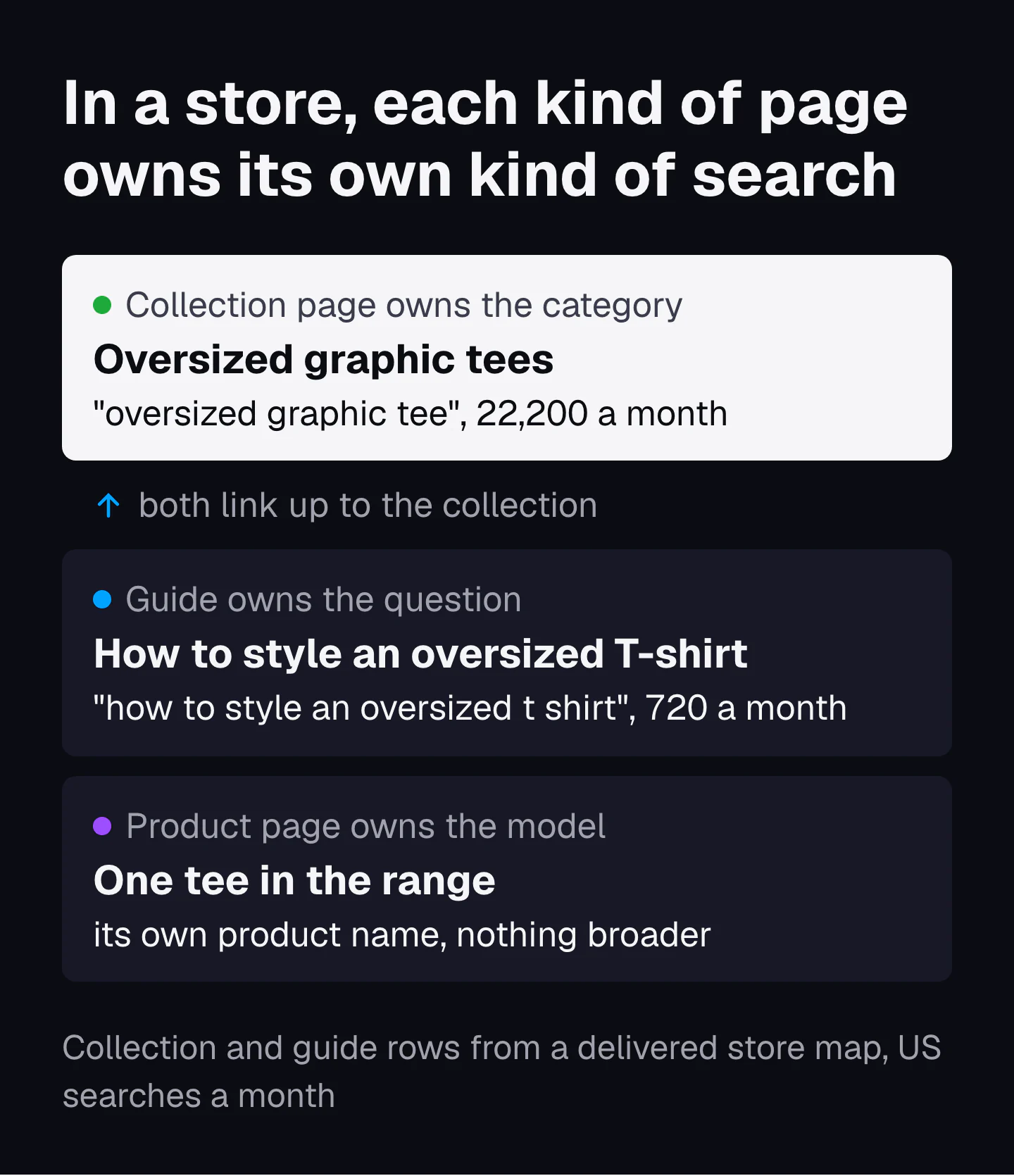
Both rows in that picture come from the map we delivered to the graphic tee store. The collection "Oversized graphic tees" owns "oversized graphic tee", 22,200 US searches a month. The guide "How to style an oversized T-shirt" owns "how to style an oversized t shirt", 720 a month, and links to the collection. The overlap check above confirmed they are two needs. Here are the six store cases I see most, with the owner for each.
| The pair | Owner page | Fix |
|---|---|---|
| Collection vs buying guide (oversized tees vs how to style them) | Each owns its own search: the collection the category, the guide the question | Leave both. The guide links to the collection with the collection's name. |
| Collection vs one product that ranks for the category term | The collection | Strengthen the collection (intro, filters, links in) and link the product up to it. Do not retitle the product as the category. |
| Two collections for one range (men's tees and t-shirts for men) | The one with more links in and better rankings | Merge and 301, or make one a real subset with its own search. |
| Filter and sort pages (color=black, sort=price) | The main collection, unless the filter matches a real search | Point a canonical at the main collection. A filter people really search for, like black graphic tees, becomes a collection of its own. |
| Variants at their own URLs (one tee in five colors) | The main product URL | Google's ecommerce guide: put the canonical product URL on every variant page. |
| Yearly posts (best graphic tees 2025, best graphic tees 2026) | One evergreen URL | Update one page every year and 301 the older posts to it. |
The variant rule is Google's own. Its guide to ecommerce URLs asks you to "include the canonical product URL on all variant pages" and to keep the number of alternative URLs that return the same content low. Many store platforms also show one product under several collection paths. Check that every path carries a canonical tag that points at the one product URL.
Store maps have more traps than these, from brand pages to gift guides. They are in topical maps for ecommerce stores.
How a topical map gives every search one owner page
A topical map names one owner page for every search before any page exists. It also lists the variants each page covers. So a second page for the same need is caught at the plan stage, not in Search Console a year later.
Libraries solved this first
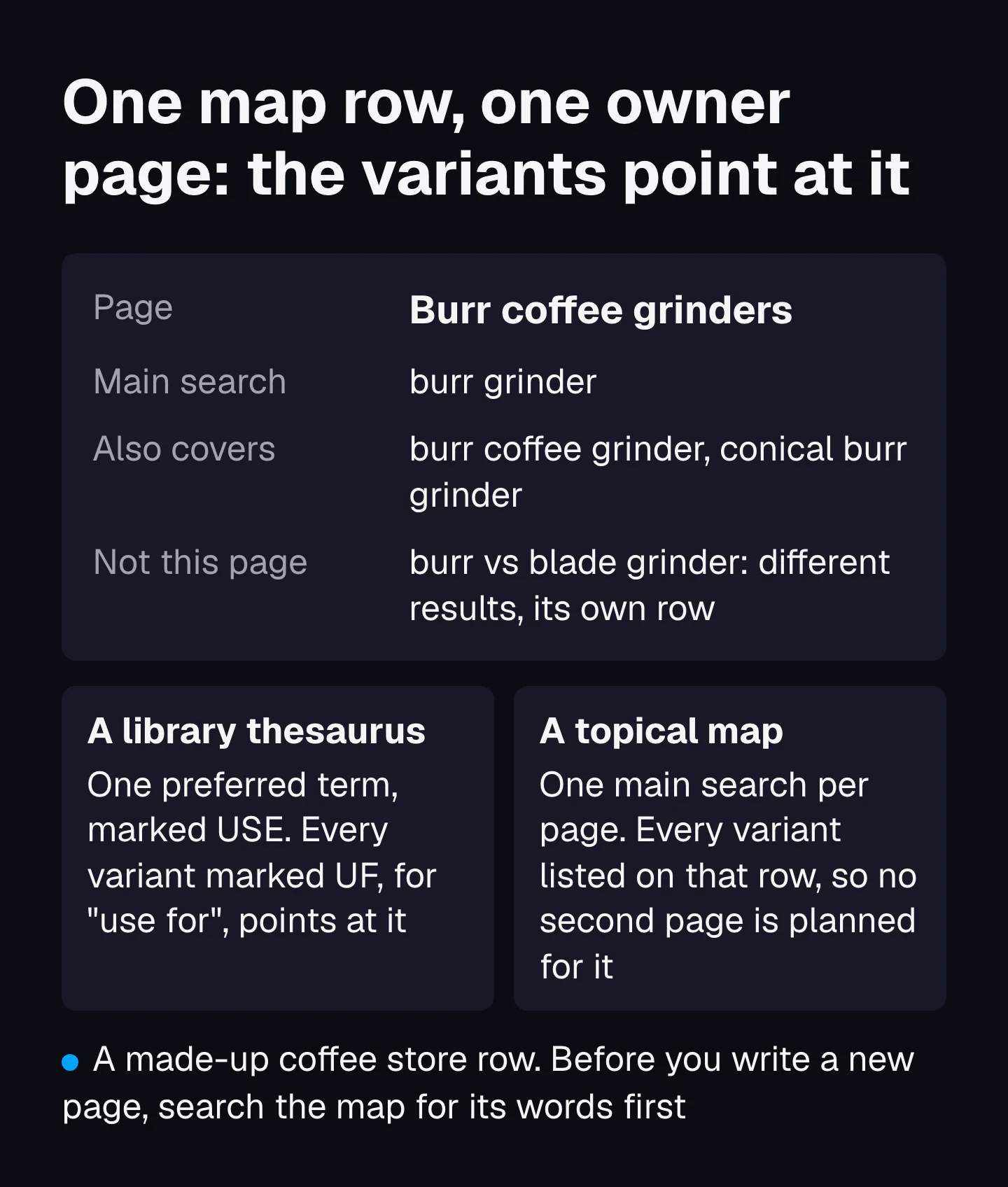
Librarians had this problem long before search engines. A thesaurus for information retrieval picks one preferred term for each concept and records every variant pointing at it. In Stella Dextre Clarke's words for ISKO, "the tags USE and UF (Use For) precede preferred and non-preferred terms respectively". The US standard for this, ANSI/NISO Z39.19, exists so that a reader looking up any variant lands on one entry.
A topical map row does the same job for pages. Its main search is the preferred term. Its "also covers" column is the UF list. A variant listed on one row can never be planned as a second page.
Google's internal documentation, leaked in 2024, points the same way: it stores the entities in each document sorted by a topicality score. A page has a first subject. A map makes sure no two pages share it.
How the map decides what gets a row
Not every search earns a row. Koray's Query Deserves a Page test, published in 2026, asks four things: high demand, different entities, low similarity to existing searches, and a pattern. A search that fails becomes a section, a table or a line on an existing page. The full test and ten real pairs are in when a search deserves its own page, and the rest of his framework is in Koray Tuğberk Gübür's topical map framework.
This is also why a keyword list breeds cannibalization: it has no owner column, so nothing stops two writers picking the same need. The difference is laid out in topical map vs topic cluster vs keyword list.
The mistakes we check for in maps people build themselves
Two pages for one need is one of the first things we check when a buyer shows us a map they built themselves. Three mistakes come up over and over. The pages do not build on each other. There are a lot of off-topic things that do not deserve to be there when they could have been part of another post. And a query does not deserve its own page: many searches are a section of a page, not a page. From there, these are the specific pairs we look for.
- Two rows with the same main search, often under different clusters.
- Two rows that differ by one word (cheap and affordable, for men and men's) with the same top 10.
- A guide row aimed at a collection search, so the blog fights the shop.
- Location or service rows that swap only the city or one word, with no facts of their own.
- A yearly row (best X 2026) planned next to an evergreen row for the same list.
Owner pages also need links in the right direction: every supporting page links to the owner with the owner's own name. That pattern is in internal links inside a topical map, and the whole build is in how to build a topical map. Or have it built: one main search per row is how our growth plan is laid out.
How to check that the fix worked
Record 28 days of clicks for the search before you change anything. Make one change. Then compare the same 28 days four and eight weeks later, against a few pairs you left alone.
Since nobody has published a controlled test, your own sites are the test. Most case stories in this space are one site, one change and no control, so a seasonal rise looks like a win. Here is a fairer way to run it.
- Measure the search, not the page. Filter Search Console by the search and note its clicks for the last 28 days across all your pages. After a merge, the owner page should carry what both pages had.
- Pick control pairs. Choose two or three other suspect pairs that you leave alone for now, and note their clicks too.
- Change one thing and write down the date. A merge, a redirect or a re-aim, never three changes in one week.
- Compare at week 4 and week 8. Use the same length of window, starting on the same day of the week. Redirects need time to settle.
- Judge against the controls. If your fixed pair rose and the controls rose as much, the season did it, not the fix.
Record it all in the worksheet below. What a working map looks like over the months after publishing is in how to tell if a topical map is working.
The cannibalization worksheet: one row per suspect pair
The worksheet holds one row per suspect pair, from the Search Console numbers to the decision and the before and after. It opens in Google Sheets, Excel or Numbers.
Download the cannibalization worksheetCSV, 24 columns, with one made-up example row to delete
| Columns | What goes in |
|---|---|
| Search, Page A, Page B | The search from the Queries tab and the two pages from the Pages tab |
| Impressions, clicks and position for each page | From the Pages tab, last 3 months |
| Second page share of impressions | Page B impressions divided by page A impressions |
| Same need, shared results, page type Google shows | The three-condition test and the top 10 overlap check |
| Owner page, decision, what changed, date changed | The fix from the decision table and the day you made it |
| Clicks before, at week 4, at week 8 | Clicks for the search across all your pages, same-length windows |
| Control pair and its clicks | A pair you left alone, measured on the same dates |
Common questions
How do you calculate keyword cannibalization?
Filter Search Console by one search, open the Pages tab and divide the second page's impressions by the top page's impressions. A high share with neither page in the top 3 is the pattern worth fixing; one agency uses 20% as its line, though no one has tested that number.
Is keyword cannibalization a Google penalty?
No. Google does not punish a site for having two pages on one search. Its site diversity system generally shows no more than two listings from one site, so the cost is that your pages compete for those places and split their links and clicks.
Does keyword cannibalization matter for AI answers?
Bing says it does. Its Webmaster Guidelines state that duplicate URLs dilute signals and reduce its confidence in selecting a URL for grounding results or citations, and that URLs focused on one primary topic are more likely to be selected.
Sources
- Importance of Topical Authority for SEO (ranking signal dilution, canonical query), Koray Tuğberk Gübür, Holistic SEO, 2021
- Achieving Positive Ranking State: 120% Growth in 4 Months, Koray Tuğberk Gübür, Medium, 2024
- Google Answers SEO Question About Keyword Cannibalization, Roger Montti, Search Engine Journal, 2025
- A guide to Google Search ranking systems, Google Search Central, 2026
- Search result plusbox including restricted results (US20110016108A1), Google LLC, Google Patents, 2011
- The use of MMR, diversity-based reranking for reordering documents and producing summaries, Jaime Carbonell and Jade Goldstein, Carnegie Mellon University, 1998
- Novelty and diversity in information retrieval evaluation, Charles L. A. Clarke and colleagues, University of Waterloo (SIGIR), 2008
- Detecting duplicate and near-duplicate files (US6658423B1), Google LLC, Google Patents, 2003
- Bing Webmaster Guidelines, Microsoft Bing, 2026
- Performance report (Search results), Google Search Console Help, 2026
- A deep dive into Search Console performance data filtering and limits, Daniel Waisberg, Google Search Central Blog, 2022
- Google Search operators: site:, Google Search Central, 2025
- Agglomerative clustering of a search engine query log, Doug Beeferman and Adam Berger (KDD), 2000
- Query clustering using user logs, Ji-Rong Wen, Jian-Yun Nie and Hong-Jiang Zhang (ACM TOIS), 2002
- Clustering query refinements by inferred user intent (US8423538B1), Google LLC, Google Patents, 2013
- Consolidate duplicate URLs, Google Search Central, 2025
- A note on unsupported rules in robots.txt, Google Search Central Blog, 2019
- Designing a URL structure for ecommerce sites, Google Search Central, 2025
- Thesaurus (for information retrieval), Stella G. Dextre Clarke, ISKO Encyclopedia of Knowledge Organization, 2017
- ANSI/NISO Z39.19-2005 (R2010), Guidelines for the Construction, Format, and Management of Monolingual Controlled Vocabularies, NISO, 2005
- RepositoryWebrefWebrefMustangAttachment (entities per document by topicality), Google Content Warehouse API documentation, leaked copy on hexdocs, 2024